NiceCopier x64 for Windows 10 - Full description
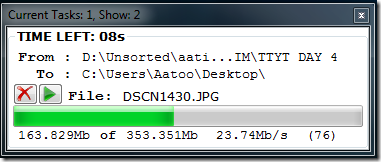
NiceCopier is an open-source file-copy utility for 64-bit Windows systems. It replaces the standard copy-task interface with a window that gathers active jobs in one place, giving users a clearer view of transfers in progress. It is intended for people who regularly move or organize files and want more control over copy operations than the basic Windows dialogs provide.
The task window can display several copy jobs at once, with the number of visible tasks adjustable in the settings. When a transfer starts, NiceCopier normally waits two seconds before showing its task window, reducing the interface's impact on performance for quick operations. A tray notification indicates when a task has finished. For transfers involving the same drive, the program queues jobs when another task is already running, organizing work rather than starting overlapping operations. Users can pause and resume tasks, and NiceCopier calculates a suitable copy speed.
When a destination contains files or folders with matching names, a single collision dialog presents the existing items in a tree view. This lets users review conflicts together and choose to ignore, rename or replace items, rather than resolving each conflict in a separate prompt. The dialog supports searching for a particular file or folder. Ignoring a folder normally skips its existing contents in that folder and its subfolders; to ignore the folder itself, users can right-click it and select the relevant option. The dialog also provides an ignore-existing choice. If no specific action is selected, the chosen operation applies to the items shown at the top of the list.
Task names are generated automatically and can be changed. To keep collision lists responsive, NiceCopier uses file and folder icons by default instead of loading each item's Windows Explorer icon. Showing the Explorer icons can be enabled, but may take longer. That option is unavailable for network folders. After a cut-and-paste transfer completes, a five-second cancellation period is provided before the source files are deleted, giving users a brief opportunity to stop that final step.
NiceCopier is suited to users who handle batches of files, run multiple transfers or need to make consistent decisions about existing destination items. It is open-source software, and the supplied system information identifies 64-bit editions of Windows Vista, Windows 7 and Windows 8 as supported. Check current system compatibility before installation, particularly on newer Windows releases.