Undelete Plus
Undelete Plus is a file recovery utility for home users and IT professionals who ... provides a guided workflow for selecting files to restore. Its interface is intended to make common recovery ...

Ontrack EasyRecovery Technician helps IT professionals recover deleted, lost or corrupted files from hard drives, SSDs, RAID arrays, USB drives and optical media. It offers quick and deep scans, file previews, RAID reconstruction, storage diagnostics and recovery support for NTFS, FAT, HFS+ and Ext2/3/4. A reporting feature helps document recovery work.
| Author: | Kroll Ontrack Inc |
| License: | Demo |
| Price: | FREE |
| Released: | Feb 17, 2025 |
| File size: | 145.00 MB |
| Downloads: | 131 |
| Keywords: | disk repair, data recovery software, Unerase, Recover File, technician, data recovery, usb file recovery, download Ontrack EasyRecovery Technician, Undelete, Recovery, file recovery technician, Restore File, Kroll Ontrack, File Recovery, Ontrack EasyRecovery Technician, Ontrack EasyRecovery Technician free download, hard drive recovery, software utility, file repair, Restore, raid recovery tool, recover deleted files, file restoration, software, data retrieval |
| Author URL: | https://www.ontrack.com/products/data-recovery-software/ |


Ontrack EasyRecovery Technician is a data recovery application from Kroll Ontrack intended for IT technicians and other professionals handling storage problems. It helps locate and restore files that have been deleted, lost or damaged, and supports work across a range of media, including hard drives, solid-state drives, RAID systems, USB drives and optical discs. Its broad device and file-system support makes it useful when recovery jobs involve different types of hardware or storage formats.
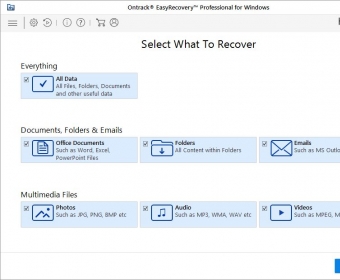
A guided workflow takes the operator through choosing a recovery scenario, scanning a device and reviewing files that may be restored. A quick scan is suited to recently deleted files, while a deep scan searches storage more thoroughly for data that is harder to find. Results can be previewed before recovery, helping technicians identify relevant files and avoid restoring unwanted items. The software supports NTFS, FAT, HFS+ and Ext2/3/4 file systems.
For RAID incidents, the application includes tools to reconstruct hardware and software RAID configurations before attempting recovery. This can help technicians examine arrays whose data is inaccessible after a configuration problem or drive failure. Recovery work can also involve encrypted drives, and the program is designed to avoid overwriting existing data during the process. Separate diagnostic tools help assess storage-device health, providing context for investigating the cause of data loss.
Technicians can use the reporting feature to document recovery activity and share a record of the work with clients or colleagues. The combination of scanning, file preview, RAID reconstruction and diagnostics suits repair and support workflows where the operator needs to assess a problem, attempt recovery and keep track of the outcome. As with other recovery tools, recovered files should be saved to a different device or location when possible, rather than back to the source being scanned.
Ontrack EasyRecovery Technician is distributed as a demo. It runs on Windows 10 and Windows 11, and also supports older Windows releases, including Windows 8, 7, Vista and XP in 32-bit and 64-bit editions. Recovery results depend on the condition of the storage device and whether the original data has been overwritten or otherwise damaged.