MyPlayCity Uninstaller
Welcome to your one-stop destination for the highly efficient "MyPlayCity Uninstaller" software, developed by the renowned MyPlayCity Inc. This Windows 10 compatible software is a must-have ...

PC Fresh analyzes running processes, services and system settings to identify possible ways to improve Windows performance. It can reduce unnecessary background activity, clear RAM and adjust performance, service and autostart options. Users can apply recommendations automatically or review them individually, and can configure Automatic PowerNow Mode to activate for a selected program. Further settings cover Windows appearance, File Explorer and networking.
| Author: | Abelssoft |
| License: | Trialware |
| Price: | $29.95 |
| Released: | Oct 6, 2026 |
| File size: | 8.50 MB |
| Downloads: | 211 |
| Keywords: | user-friendly interface, PC optimization, Tuneup, Defragment, Optimize Computer, download PC Fresh, Tuneup System, windows pc optimizer, clear ram memory, Abelssoft tools, privacy protection, system optimization, Abelssoft, system performance tuner, pc fresh, Analyze, PC Fresh free download, user-friendly, software management, Defragment Disk, system performance, Optimize, manage startup programs, PC Fresh, Windows utilities, control windows services, performance enhancement |
| Author URL: | https://www.abelssoft.de/en/windows/security-privacy/antibrowserspy |
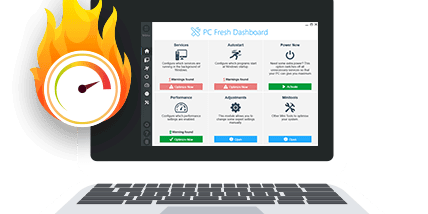
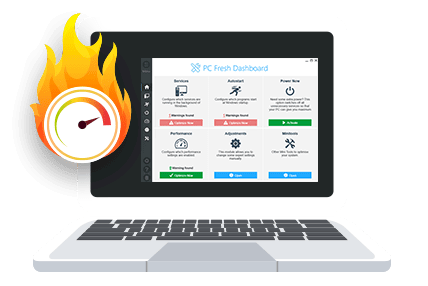


PC Fresh is a Windows system-tuning utility for people who want to review background activity and adjust settings that may affect a computer's responsiveness. It analyzes running processes, services and system configuration to identify possible optimizations. Users can apply suggested changes automatically or inspect them first, making the program suitable both for a quick cleanup and for more hands-on tuning.
The Dashboard provides an Accelerate option for users seeking a fast performance adjustment. PC Fresh scans active processes and services for items it considers unnecessary, then can reduce their activity to free system resources. It can also clear RAM, which may provide a temporary improvement when memory is occupied by programs that are no longer needed. These actions focus on current system activity rather than replacing hardware or removing installed applications.
For more targeted tuning, PC Fresh includes controls for performance, Windows services and programs that start automatically. Reviewing autostart entries can help limit the software that loads when Windows starts, while service controls let users examine background components. The Adjustments menu goes further, offering settings related to Windows appearance, File Explorer, startup behavior and network configuration. Suggested changes are presented in the interface so users can decide which adjustments fit their setup.
Automatic PowerNow Mode can be configured to activate when a chosen program launches. This is intended for workloads such as games or other demanding applications, allowing a performance-oriented configuration to be triggered for a specific use rather than applied all the time. The feature complements the manual acceleration controls, while the analysis and suggestion workflow gives users a way to make individual changes instead of relying only on a broad optimization.
PC Fresh is aimed at casual users who want a central place to check common performance and startup settings, as well as more experienced users who prefer to review configuration options themselves. Its license is trialware. It supports Windows 11, Windows 10, Windows 8 and Windows 7, with 32-bit and 64-bit support stated for Windows 10, 8 and 7. Results depend on the computer and the changes made; reviewing proposed adjustments can help avoid disabling a service or startup item needed for a particular setup.