WIDCOMM Bluetooth
... wizard helps prepare the computer's Bluetooth environment. Once configured, users can pair devices and transfer files between the PC and other Bluetooth-enabled equipment. The package ...

Preferred Filter Tweaker changes Windows preferences for DirectShow audio and video decoders, without requiring manual Registry edits. It can route DirectShow playback in Windows Media Player or Media Center to an installed third-party filter such as ffdshow or CoreAVC. The utility also offers Media Foundation controls for selected file types, with trade-offs such as missing thumbnails.
| Author: | Codecguide |
| License: | Freeware |
| Price: | FREE |
| Released: | Jun 23, 2021 |
| File size: | 1.10 MB |
| Downloads: | 266 |
| Keywords: | media foundation settings, Windows 10 compatibility, codec management, x64 software, Codecguide, DirectShow filter changer, configure DirectShow filter, ffdshow filter settings, change windows video decoder, filter, change DirectShow filter, directshow filter tweaker, multimedia control, preferred audio decoder, configure directshow filters, DirectShow, Preferred Filter Tweaker, configure |
| Author URL: | https://www.codecguide.com/ |
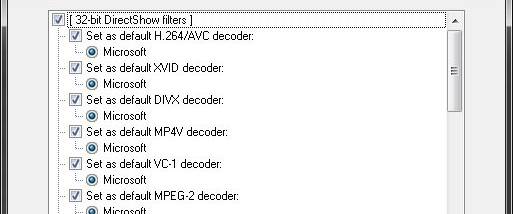

Preferred Filter Tweaker is a Windows utility for choosing which DirectShow filters Windows uses to decode supported audio and video formats. It is aimed at users who want Windows Media Player or Media Center to use a third-party decoder instead of a built-in Microsoft filter. The tool changes Windows filter preferences that would otherwise require manual Registry edits, and provides a way to restore the original settings.
The utility is useful when a preferred decoder, such as ffdshow or CoreAVC, is installed but a Microsoft player continues to use a native filter. It lets users set preferred filters with a few mouse clicks. These choices apply only when an application plays content through DirectShow; third-party players with their own filter-selection controls may not need the utility.
Windows Media Player and Media Center can use Media Foundation rather than DirectShow for some formats, including MP4, MOV and M2TS. In those cases, changing DirectShow preferences alone does not make the players use a third-party DirectShow decoder. Preferred Filter Tweaker can disable Media Foundation for selected file extensions, though doing so also disables thumbnails for those file types. It can also disable Media Foundation and other Microsoft playback components more broadly by renaming system files, a change that may affect functions such as live TV playback in Media Center.
The tool is intended for users troubleshooting decoder selection or customizing playback in Microsoft media applications. It does not replace a decoder: the desired third-party filter must already be installed, and the application must use DirectShow for the chosen preference to take effect. The changes made by the utility can be undone, including changes to playback components, allowing Windows to return to its previous configuration. Preferred Filter Tweaker is freeware for Windows 7, Windows 8, Windows 10 and Windows 11.