Bananas Screen Sharing
Discover seamless collaboration with Bananas Screen Sharing, the innovative software developed by MistweaverCo, designed to elevate your remote communication experience. Whether you're conducting virtual meetings, sharing ...

Remotera provides remote desktop access for troubleshooting computers, supporting users and reaching a work or home PC from another location. It supports multiple simultaneous connections, voice and audio calls, file and folder transfer, and remote printing. A contact book stores frequently used connections, while unattended access can connect to a configured computer without someone present to accept the session.
| Author: | TkoSoft |
| License: | Freeware |
| Price: | FREE |
| Released: | Oct 25, 2026 |
| File size: | 14.20 MB |
| Downloads: | 138 |
| Keywords: | remote pc support, download Remotera, remote desktop, screen sharing, remote desktop access, unattended remote access, Remotera free download, remote printing software, remote access, Remotera, RDP, remote, session, screen sharing software, transfer, file transfer between computers |
| Author URL: | https://www.tkosoft.com/products/filebricks |
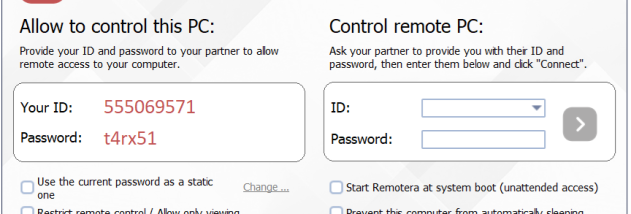




Remotera is a remote-access and desktop-control program for connecting to other computers over the internet. It is intended for IT staff, support teams, businesses and individuals who need to troubleshoot a computer or work on a remote PC. Its two-sided interface keeps connection details easy to find: one side displays the local computer's ID and password, while the other provides fields for entering a remote computer's IP address and passcode.
The program can keep connections to multiple remote PCs active at the same time, which is useful when support work involves several users or machines. During a session, users can control the remote computer and communicate with the person at the other end through voice and audio calls. Options such as unattended access allow a configured computer to be reached without someone there to accept the connection. Other settings can prevent the remote PC from going to sleep or restrict who is allowed to connect.
A built-in contact book helps organize computers that are accessed regularly. Saving a contact avoids repeatedly entering or recalling connection details, making recurring assistance easier to manage. Remotera also transfers files and folders between connected computers, so documents and other items can be moved without ending the session. Its remote-printing feature sends a print job from the remote computer to a local printer, supporting workflows where a document needs to be printed at the support worker's location.
These tools suit remote troubleshooting, routine assistance for employees or clients, and accessing a work or home computer from another location. Multiple simultaneous sessions can help support staff handle several connections, while the contact book and unattended-access option are useful for repeat maintenance. File transfer and remote printing extend the session beyond screen control, allowing common support tasks to be completed without being physically at the other computer.
Remotera is freeware from TkoSoft for Windows 10 and Windows 11, with support for 32-bit and 64-bit Windows 10 systems. Connections require the relevant computer's address and passcode unless unattended access has been configured. The program's controls cover connection setup, access preferences, communication, file movement and printing in one remote-support workflow.