Remote Process Viewer
... view of all active processes running on a remote computer. It's a must-have tool for IT professionals, system administrators, and tech enthusiasts alike. The Remote Process Viewer stands out for its simplicity and ...

AnyDesk connects users to a remote computer and lets them interact with its desktop over a network or the internet. Its DeskRT codec is designed to transmit graphical interfaces with low added latency, helping keep typing, navigation and other input responsive. It can be used for remote support, accessing work applications from another location, or working with CAD, video editing and office software running on the remote machine. AnyDesk supports local-network connections and is multilingual.
| Author: | philandro Software GmbH |
| License: | Shareware |
| Price: | $19.92 |
| Released: | Oct 27, 2026 |
| File size: | 8.20 MB |
| Downloads: | 5641 |
| Keywords: | remote connection, remote computer access, Lightweight Software, Cross-Platform Compatibility, remote technical support, remote desktop software, remote desktop connection, remote, connect, remote pc connection, remote computer, remote desktop, High Frame Rates, Remote Access, connection, Secure Unattended Access, Low Latency, control another computer |
| Author URL: | https://anydesk.com/ |
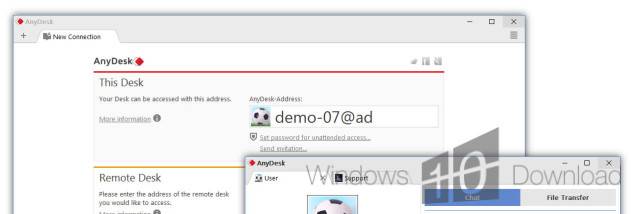





AnyDesk is remote desktop software for connecting to and controlling another computer over a network or the internet. It is used by individuals who need access to a computer while away from it, as well as support staff and teams who work with remote machines. The program displays the remote desktop in a session window and sends keyboard and mouse input to the connected computer, allowing users to work with its applications without being physically present.
The software uses DeskRT, a video codec developed for graphical user interfaces, to encode and transmit screen changes. This approach is intended to keep remote interaction responsive, which matters when typing, navigating menus or manipulating visual content. Connection performance also depends on the network between the two computers, so responsiveness can vary with available bandwidth, latency and local network conditions. AnyDesk supports both internet connections and access within a local network.
A remote session can be useful for providing technical assistance, accessing files and applications on an office computer, or continuing work from a different location. It can also support tasks that benefit from seeing the remote computer directly, including work with CAD programs, video editing software and office applications. Because the remote machine remains the one running the application, its installed software and working files can be used through the connection rather than recreated on the connecting device.
The interface is designed to keep the connection and remote desktop as the focus of the workflow. Once connected, users can interact with the remote system in much the same way as they would locally, while the computer being accessed performs the actual application processing. This can be useful when the remote computer has the required tools or project files, or when a colleague needs to demonstrate an issue on their own machine. AnyDesk is multilingual and is available for Windows 10 and Windows 11, including 32-bit and 64-bit editions. It is freeware; the software is also listed for several Windows Server releases and older Windows versions.