SpiderOak for Windows 10 - Full description
SpiderOak is a cloud backup, synchronization, and file-sharing application for people who want to keep files from multiple computers in one managed account. Its Windows client combines backup controls with tools for browsing stored content, syncing folders, and sharing selected files. The service uses a zero-knowledge security design intended to keep stored data private from the provider, making it relevant for users handling personal or work files that need protection beyond a single device.
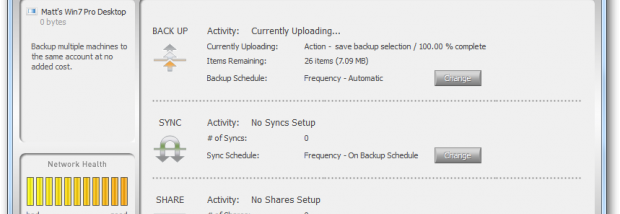
The backup feature runs in the background and monitors selected content for new or changed files, including documents, photos, music, and video. After the initial setup, this helps keep a remote copy current without requiring users to start each backup manually. SpiderOak's account can include more than one computer, with those devices drawing on the account's shared storage. If a local file is lost or a computer fails, the stored copy can be browsed and restored to a device.
Synchronization keeps chosen folders consistent across connected computers, which is useful for continuing work from different machines. The application also provides a central view of backed-up files, so users can inspect stored content rather than treating cloud storage as an inaccessible archive. Sharing tools let an account holder send files or folders to other people; recipients can access shared items without creating an account. These functions support both private file transfer and access to materials used by a team or household.
Typical uses include safeguarding photos and documents, keeping work folders available on home and office computers, recovering files after hardware trouble, and sending selected items to people who do not use SpiderOak. Backup, synchronization, browsing, and sharing are presented as separate parts of the application, allowing users to manage protection and collaboration from one interface. An internet connection is needed to transfer data and reach remote copies, while local files remain on the computer as well.
SpiderOak is freeware, and the Windows operating systems listed for the client include Windows 10. The storage allocation is shared among computers on an account, so the amount of data being protected affects how much space is required. The software is intended for Windows desktop use; the service is also designed to work across multiple computers and platforms. Users should check current service and system requirements before installation, as cloud-service availability and supported Windows editions can change.