Sync Breeze Pro x64
Sync Breeze Pro is a Windows file synchronization utility for users who need to keep folders ... or network locations. It supports routine copy and synchronization work as well as larger file collections, with ...

Sync Breeze Pro synchronizes files between local disks, network shares and cloud storage. Users can run jobs manually, on a schedule or in real time, and create profiles with filters based on file type, size or date. One-way and two-way modes support different workflows, while logs, reporting, file versioning and integrity checks help monitor results.
| Author: | Flexense Computing Systems Ltd |
| License: | Demo |
| Price: | $50.00 |
| Released: | May 15, 2026 |
| File size: | 7.40 MB |
| Downloads: | 264 |
| Keywords: | real time file sync, file synchronization, scheduled folder sync, synchronization, file sync profiles, synchronize directory, data replication, file synchronization software, backup, synchronize network shares, sync folders, Flexense Computing Systems Ltd, copy, network synchronization, Windows 10 compatible software, advanced syncing capabilities, Sync Breeze Pro |
| Author URL: | https://www.syncbreeze.com/ |

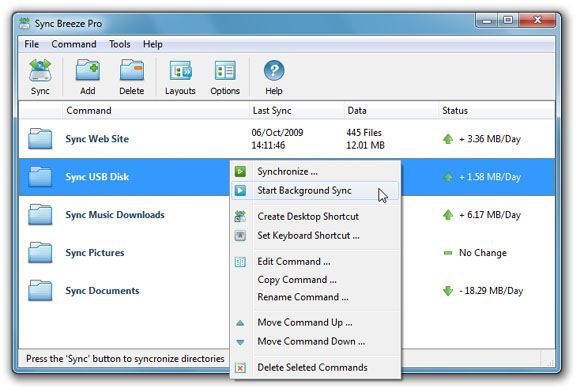



Sync Breeze Pro is a file synchronization utility for individuals and organizations that need to keep folders consistent across storage locations. It can synchronize files between local disks, network shares and cloud storage services, with controls for running tasks manually, on a schedule or in real time. Multiple profiles let users set up separate jobs for different folders and workflows rather than configuring each sync from scratch.
Each profile can include rules and filters that determine which files are processed. Filters can use criteria such as file type, size and date, helping users exclude irrelevant files or narrow a job to a particular set of data. One-way synchronization copies changes in a chosen direction, while two-way synchronization keeps both locations updated. These modes suit different needs: one-way jobs can maintain a destination copy, while two-way jobs help keep working folders in step across locations.
The application provides a dashboard for reviewing synchronization tasks and their status, and its menus and dialogs are used to create, edit and manage profiles. Scheduling supports recurring work, while real-time synchronization can apply changes as they occur. Reporting and logs provide a record of activity that can help users check results and investigate problems. File versioning can retain earlier file states for recovery, and integrity verification checks synchronized files for corruption.
Typical uses include keeping work folders aligned between a computer and a network share, maintaining copies of important files, and coordinating shared data across storage locations. The combination of filters, synchronization modes and multiple profiles makes it possible to use different rules for separate projects or data sets. Encrypted file transfers and password protection for profiles are also included, along with integration with Windows security policies.
Sync Breeze Pro is commercial software offered as a demo. It is available for Windows 10 and Windows 11, as well as a range of Windows Server editions. The interface and profile-based workflow serve both occasional personal synchronization and more structured file-management tasks; users should choose synchronization direction and filters carefully to ensure that each job changes only the intended files.