Paint.NET
Paint.NET is a raster image and photo editor for Windows, suited to people who want tools for retouching and creating images without the complexity of a professional graphics suite. ...

Synfig Studio is an open-source 2D animation application for creating scenes with vector graphics, bitmap artwork or both. Its layer system includes geometric, gradient, filter, distortion and transformation layers for building and adjusting compositions. A bone system helps rig characters and animate connected parts without redrawing every pose. It supports formats such as SVG, PNG and GIF, with export options including AVI, MPEG and animated GIF.
| Author: | Robert Quattlebaum |
| License: | Open Source |
| Price: | FREE |
| Released: | Mar 16, 2026 |
| File size: | 103.00 MB |
| Downloads: | 312 |
| Keywords: | vector animation, Windows Compatible, Render animation, open source animation, character rigging, 2D Animation, Open-Source, 2d animation software, Synfig Studio, paint, animation layers, Vector-Based, Animation Software, bitmap animation, image, Bitmap animation, picture, Create 2D animation, graphic, animation |
| Author URL: | https://www.synfig.org/ |

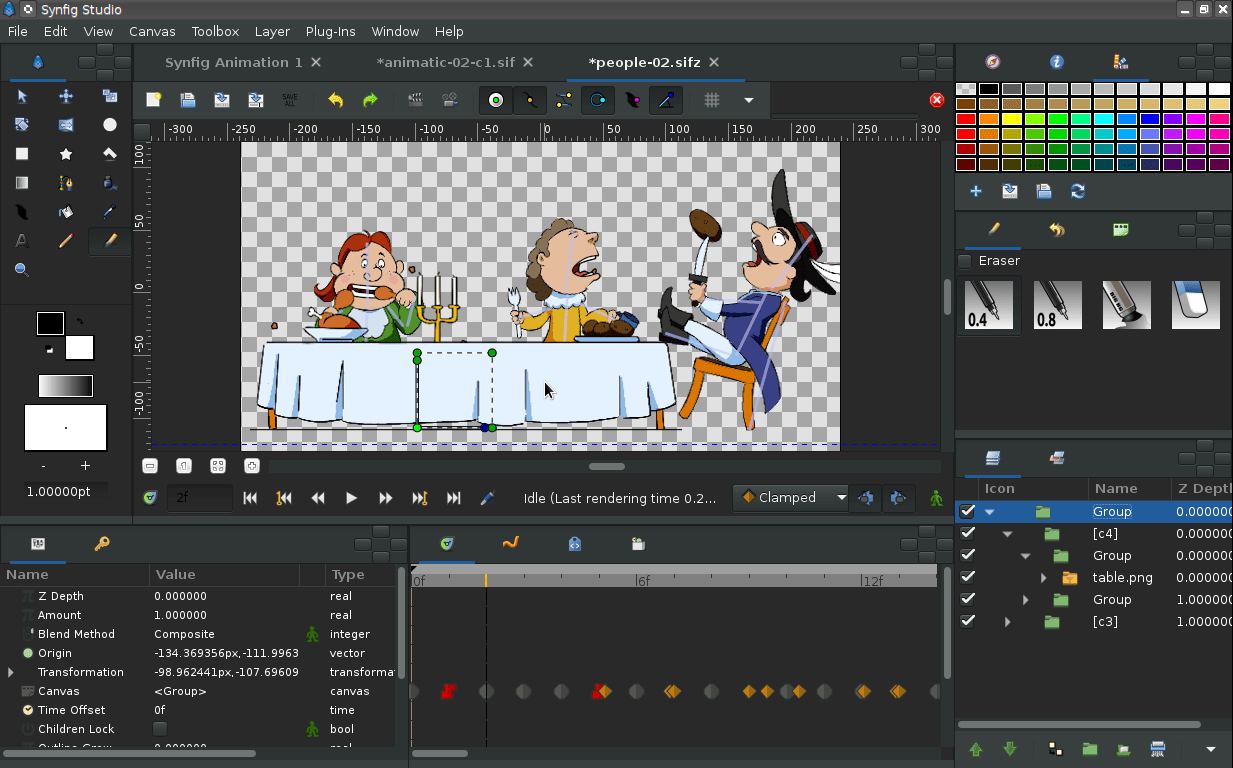



Synfig Studio is an open-source application for making 2D animations. It is suited to artists, hobbyists and small production teams who want to build animated scenes from vector artwork, bitmap images or a mix of both. Its vector-based workflow keeps drawn shapes scalable, while timeline and layer controls provide a way to organize artwork and change it over time without relying entirely on hand-drawn frames.
The layer system forms the basis for assembling a scene. Geometric layers create shapes, gradient layers add color transitions, and transformation layers control an object's position or appearance. Filter and distortion layers can be used to modify artwork and create visual effects. By arranging these elements separately, animators can edit one part of a composition without rebuilding the rest. Bitmap artwork can also be incorporated, which is useful when a scene combines painted assets with vector characters or backgrounds.
For character work, Synfig Studio includes a bone system for creating rigs and controlling connected parts. A rig lets an animator pose a character and produce movement through its structure, reducing the need to redraw every pose. The timeline provides a place to manage changes across the animation, while the customizable interface lets users arrange panels and tools around their workflow. The range of controls can take time to learn; tutorials and documentation help explain the workspace and animation process.
The software can be used to create animated characters, illustrated scenes, motion graphics and short clips. SVG, PNG and GIF are among the supported artwork formats, and animations can be exported in formats such as AVI, MPEG and animated GIF. These options make it possible to prepare assets for further editing, sharing or playback in other applications. The vector and bitmap workflows also suit projects where drawn graphics and imported images need to appear together.
Synfig Studio is free and open source. It is available for Windows 10 and Windows 11, including 32-bit and 64-bit Windows 10 systems. Users should check that their computer has enough resources for the size and complexity of their scenes, since layered artwork and animation can become demanding as projects grow. Its extensive controls suit users who want detailed control over 2D animation, while beginners may benefit from learning the interface through smaller projects first.