Shell
Discover the power of Shell, an innovative software developed by Mahmoud Gomah, designed to enhance your Windows 10 experience. Shell redefines the way you interact with your operating ...

TortoiseHg is a graphical client for Mercurial repositories, intended for developers who prefer desktop tools to command-line workflows. Its Windows Explorer integration provides repository actions from folder context menus. Users can review file changes and diffs, commit work, clone repositories, and pull or push changes. A graphical history view displays changesets, branches, and merges, while visual tools help inspect revisions and combine parallel work. The open-source application supports Windows 10 and Windows 11.
| Author: | TortoiseHg |
| License: | Open Source |
| Price: | FREE |
| Released: | Apr 28, 2025 |
| File size: | 29.80 MB |
| Downloads: | 345 |
| Keywords: | Shell Extension, mercurial gui client, view mercurial changesets, tortoisehg download, open-source software, Extension, software development tool, Mercurial integration, Mercurial SCM, Shell, Context Menu, mercurial repository manager, graphical user interface, version control system, windows explorer mercurial, mercurial version control, Windows compatible, SCM |
| Author URL: | https://tortoisehg.bitbucket.io/ |

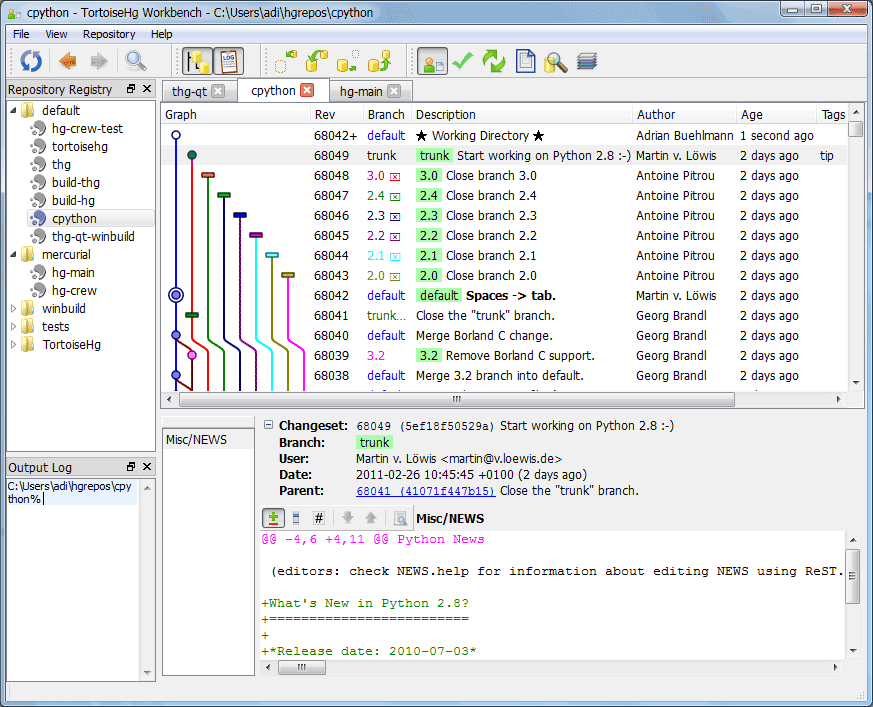



TortoiseHg is a graphical client for Mercurial, the distributed version control system used to track changes in source code and other files. It is aimed at developers who want to manage repositories through desktop tools rather than relying entirely on command-line commands. By presenting repository operations in windows and menus, it makes common tasks easier to inspect and repeat while retaining Mercurial's support for local and distributed development workflows.
On Windows, TortoiseHg integrates with File Explorer so repository actions can be opened from a folder's context menu. Users can create or clone a repository, review pending changes, commit work, and synchronize with other repositories through graphical dialogs. The interface shows file status and diffs, helping developers check which files have changed and what a proposed commit contains before recording it. Pull and push operations support exchanging changes with remote repositories, while update and merge tools help bring a working copy in line with other revisions.
The graphical history view displays changesets and their relationships, including branches and merges. Selecting a revision lets users examine its changed files and compare revisions, making it easier to follow how a project developed or identify when a change entered the repository. Visual merge tools assist when separate lines of work need to be combined, and repository browsers provide another way to inspect tracked files and history. These views are useful for reviewing work without having to reconstruct the project's timeline from command output.
TortoiseHg can support both individual work and team collaboration. A developer working alone can keep a history of edits, compare earlier versions, and recover or build on previous work. In a team, contributors can exchange changes through shared or hosted repositories, inspect incoming updates, and merge parallel work. Its repository tools are relevant to source-code projects as well as other file-based work that benefits from recorded revisions; the actual collaboration process depends on the team's repository and branching practices.
The software is open source and is intended for Windows, including 32-bit and 64-bit Windows 10 and Windows 11 systems. Its Explorer integration is specific to the Windows desktop workflow. TortoiseHg provides a graphical way to work with Mercurial repositories, but users should understand the project's repository conventions and review changes before committing or merging. It is best suited to people and teams whose projects use Mercurial rather than Git or another version control system.