Program Picker
Welcome to the ultimate destination for your Windows 10 software needs. Here, we present to you "Program ... Design Ltd. This software is a game-changer for Windows 10 users, offering an advanced and intuitive way to ...

TurboLaunch is a configurable Windows toolbar for launching programs, files, shortcuts, and folders, as well as running system actions and network connections. Buttons can be created by drag and drop or configured with a command, parameters, working folder, and window style. Each button can have a custom icon and keyboard shortcut. Users can arrange buttons in rows, columns, or groups, resize them, hide the title bar, and keep the toolbar above other windows.
| Author: | Savard Software |
| License: | Shareware |
| Price: | $20.00 |
| Released: | Jan 8, 2013 |
| File size: | 1.31 MB |
| Downloads: | 298 |
| Keywords: | programmed action launcher, TurboLaunch, programmed, Savard Software, launch, quick launch toolbar, run program, network connection shortcut, programmed action, windows program launcher, action, Windows 10, application start, x64 compatibility, custom toolbar launcher, software utility, keyboard shortcut launcher |
| Author URL: | http://www.savardsoftware.com/ |
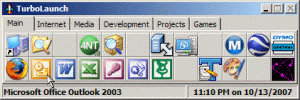

TurboLaunch is a configurable toolbar for Windows that gives quick access to programs, files, folders, system commands, and network connections. It is suited to people who want a compact launch panel for frequently used items, or keyboard shortcuts for common tasks. Buttons use pictures to make their functions recognizable, and the toolbar's layout and appearance can be adjusted to fit different workflows and screen space.
Buttons can be set up by dragging a program, file, shortcut, or folder onto the toolbar. For more control, a button can be configured manually with a command, parameters, working folder, and window style. Each button can also receive its own keyboard shortcut, so an item or action can be started without opening the toolbar or navigating through folders. Icons are assigned automatically from the selected item, but they can be changed to help distinguish buttons.
In addition to launching items, buttons can run built-in actions such as activating the screen saver, shutting down or restarting Windows, and installing a program. These commands put routine system tasks within one click or a keyboard command. TurboLaunch can also establish network connections, including Internet or VPN connections. Connection buttons support automatic redial and can disconnect an existing connection, while assigned shortcuts provide a direct way to connect or disconnect.
The toolbar can be arranged with different numbers of button rows and columns, and buttons can be organized into groups. Its title bar can be removed, the window can be kept above other windows, and button sizes can be changed to prioritize visibility or conserve desktop space. These options make it possible to build a small launcher for a few everyday tasks or a more extensive panel for work involving multiple applications and commands.
TurboLaunch is shareware from Savard Software. Its supported operating systems include Windows XP, Vista, 7, 8, and 10, with both 32-bit and 64-bit editions listed for several releases. The program is useful for Windows users seeking a customizable alternative to repeatedly opening Start menus, desktop shortcuts, or system settings. Buttons can be edited as needs change, allowing the toolbar to serve as a central place for both application shortcuts and frequently used actions.