TweakNow WinSecret
TweakNow WinSecret is a Windows utility for changing system settings, ... applying changes, especially when altering unfamiliar options. For maintenance, WinSecret includes tools to remove unnecessary files, manage programs ...

TweakNow WinSecret collects Windows settings and maintenance tools in one utility. It provides access to less prominent system options, plus tools to clean unnecessary files, manage startup programs, optimize memory usage and scan for invalid registry entries. Users can also configure security settings, securely delete files, and personalize the desktop, taskbar, Start menu, sounds and animations. It is trialware for Windows 10 and Windows 11.
| Author: | Tweak Now |
| License: | Trialware |
| Price: | $24.99 |
| Released: | Oct 11, 2026 |
| File size: | 88.20 MB |
| Downloads: | 220 |
| Keywords: | enhance, system optimization, TweakNow WinSecret free download, improve, startup program manager, user-friendly interface, registry tweak, tweak, windows system tweaker, improvement, download TweakNow WinSecret, TweakNow WinSecret, improve performance, software utility, registry cleaner utility, system tweak, system o, performance enhancement, windows file cleanup, Windows customization, secure file deletion, desktop customization tool, privacy settings, user interface |
| Author URL: | http://www.tweaknow.com/contact.php |

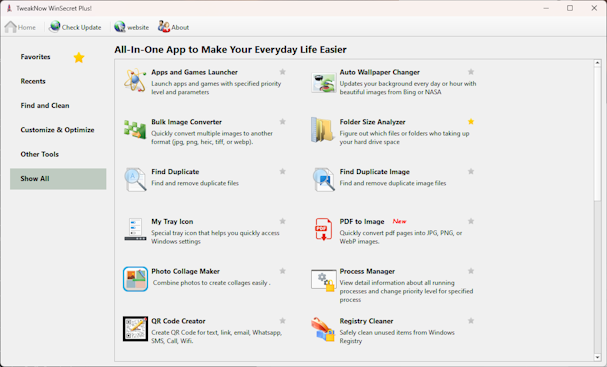




TweakNow WinSecret is a Windows utility for people who want to adjust system settings, tidy up routine maintenance tasks and personalize parts of the desktop from one interface. It brings together controls for options that may be difficult to find in Windows, alongside tools for cleaning files and managing startup behavior. Its range of settings makes it relevant to both everyday users seeking straightforward adjustments and experienced users who want more control over system configuration.
The program provides access to hidden or less prominent Windows settings related to performance, security and interface behavior. Users can browse these controls to change how the operating system works or looks, rather than searching through separate Windows menus. The included optimization tools cover removal of unnecessary files, startup program management and memory usage optimization. Disabling programs that do not need to launch with Windows can help reduce startup clutter, while file cleanup provides a way to clear unwanted data.
A registry cleaner is included to identify and remove invalid registry entries. Registry changes can affect installed software and Windows behavior, so users should take care when choosing what to clean. WinSecret also offers security and privacy controls, including options to configure system security settings and securely delete files. Secure deletion is intended to make deleted personal files harder to recover, which can be useful when disposing of sensitive data on a computer.
For desktop personalization, WinSecret offers settings for the desktop, taskbar and Start menu, as well as system sounds and animations. These options let users tailor visual and audio details without relying solely on the standard Windows customization screens. The combination of appearance controls and system tweaks makes the utility suitable for routine personalization as well as occasional maintenance and configuration work.
TweakNow WinSecret is trialware for Windows 10 and Windows 11, with support for both 32-bit and 64-bit Windows 10 systems. It is useful for users who prefer a collection of settings and maintenance tools in one application, but system tweaks and cleanup actions should be reviewed before they are applied, particularly on a computer that depends on specialized software or carefully configured settings.