VDownloader 4.2.1875.0 review by albino cerqueira (Oct 27, 2016)

THE BEST PROGRAM

VDownloader is a Windows utility for downloading online videos to a computer for offline viewing. It supports video sources including YouTube, Vimeo, Metacafe, Google Video, DailyMotion and Yahoo! Video. Downloads can be converted to formats such as AVI, MPEG, WMV, MP4 or MP3 for playback on other devices. The freeware includes a multilingual interface.
| Author: | Vitzo LLC |
| License: | Freeware |
| Price: | FREE |
| Released: | Apr 5, 2021 |
| File size: | 162.46 MB |
| Downloads: | 2601 |
| Keywords: | Windows 10 compatible, convert video to mp4, mp3, youtube video download, mpeg, vimeo, convert, mp4, flash, youtube, VDownloader, movies, dailymotion, download, video downloading software, video, flv, video downloader, veoh, save videos offline, avi, facebook, wmv, videos, myspace, free, online video converter, online, user-friendly interface, windows, Vitzo LLC, high-speed downloads, save, video to mp3, songs |
| Author URL: | http://vitzo.com |
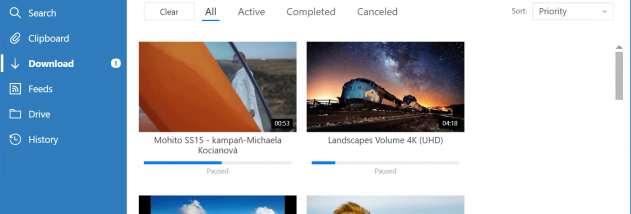

VDownloader is a Windows utility for saving online videos to a computer for offline viewing. It is aimed at people who want to keep copies of videos they can access on supported sharing sites, such as YouTube, Vimeo, Metacafe, Google Video, DailyMotion and Yahoo! Video. Once saved, a video can be watched without an internet connection, which is useful when travelling or when a connection is unreliable.
The main task is to download a video from a supported website and store it locally. This can help preserve access when a page becomes unavailable or its privacy settings change, though it does not bypass access restrictions. Having a local copy also avoids buffering caused by a slow or throttled connection. Site availability and download behavior can vary as online services change.
VDownloader can convert downloaded videos to other formats, allowing files to be prepared for playback on a range of devices. The supplied formats include common video types such as AVI, MPEG, WMV and MP4, as well as MP3 for audio. Conversion is useful when a device or media player does not support the original file format, or when only the soundtrack is needed. The program combines downloading and conversion in one workflow, so a video can be saved and then prepared for a different player without using separate utilities.
Typical uses include building a personal offline collection, keeping a locally accessible copy for later viewing, and preparing media for portable devices. It can also help users organize videos they have permission to save, rather than relying on a streaming page remaining available. Users should follow the copyright rules and terms of the relevant websites when downloading or converting content.
VDownloader is freeware from Vitzo LLC and is available in multiple interface languages, including English, French, German, Spanish, Arabic, Chinese, Japanese and Portuguese. The stated system requirements include Windows 7 Service Pack 1, .NET Framework 4.5.2, a 1 GHz processor and 2 GB of RAM. Although the program is associated with several Windows releases, compatibility with current systems should be checked before installation.
THE BEST PROGRAM