BackUp Maker
... their data and want to ensure its safety. BackUp Maker is a robust and reliable tool that automates the process of creating backup copies of your important files and folders. The ...

Windows 7 USB/DVD Download Tool is a free Microsoft utility that copies a Windows 7 ISO to a USB flash drive or DVD and prepares it as bootable installation media. Users can launch Setup.exe from the media in Windows or boot a computer from it for a clean installation. A Windows 7 ISO is required separately.
| Author: | Microsoft |
| License: | Freeware |
| Price: | FREE |
| Released: | Dec 11, 2009 |
| File size: | 2.60 MB |
| Downloads: | 541 |
| Keywords: | Windows 7 USB/DVD Download Tool, ISO file processing, x64 software, Windows 7 ISO, windows 7 dvd tool, Windows 7 installation, Windows 10 compatibility, create bootable usb, bootable dvd creator, backup, usb installation media, windows 7 usb tool, bootable media creation, Microsoft, Windows 7 backup, windows 7 iso installer, storage, Windows 7 |
| Author URL: | https://www.microsoft.com |
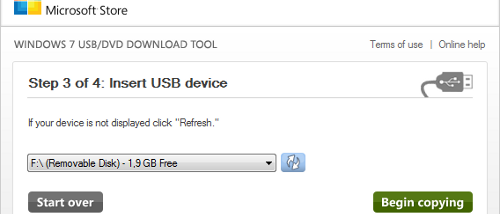

Windows 7 USB/DVD Download Tool is a free utility for turning a Windows 7 ISO image into installation media. It is intended for people preparing a clean installation or reinstalling Windows 7, including on a computer that cannot start an existing operating system. The tool writes the ISO contents to a USB flash drive or DVD and makes the resulting media bootable.
To begin, the user selects a Windows 7 ISO file and chooses a USB drive or DVD as the destination. The tool copies the installation files and prepares the selected medium for startup. A USB drive is useful on computers without an optical drive, while a DVD provides a physical installation disc. The destination drive must have enough space, and any files already stored on a USB drive should be copied elsewhere before it is prepared.
After creation, the media can be used in two ways. From a working Windows installation, Setup.exe in the root folder starts the installer. For a fresh installation, the computer can instead be started from the USB drive or DVD, allowing setup to run without first loading an operating system. The computer may need its boot order changed in BIOS or firmware settings so that it checks the installation media before its internal drive.
The utility handles the transfer and bootable-media preparation; it does not provide the Windows 7 ISO itself. A valid ISO must be obtained separately. The source ISO combines Windows installation files into one image, and copying that image to a USB drive or DVD is necessary before using it to install Windows. The created media can also serve as a means of reinstalling Windows on a licensed computer, subject to the applicable Windows license terms.
Windows 7 USB/DVD Download Tool is freeware from Microsoft and is designed for Windows 7 installation media. Its supported host systems include Windows XP, Windows Vista, Windows 7 and Windows 8, including listed 64-bit editions of Vista, Windows 7 and Windows 8. It is a focused utility rather than a general-purpose backup or disk-management program, so it is most useful when a Windows 7 ISO needs to be made bootable on USB or DVD.