WinHex for Windows 10 - Full description
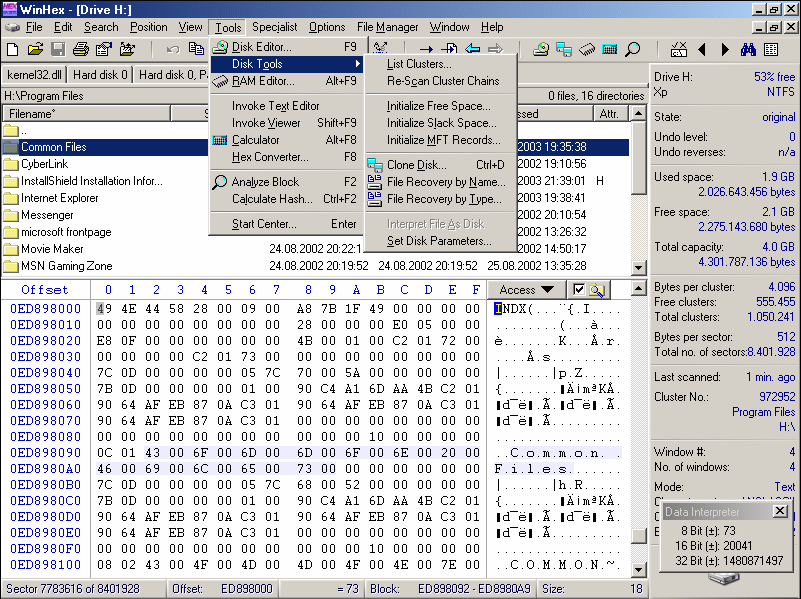
WinHex is a hexadecimal editor and data analysis tool from X-Ways Software for users who need to inspect or modify information at the byte level. It can work with binary files, disk drives, and system memory, making it relevant to IT specialists, data recovery work, and digital forensic examination. Instead of presenting content only as text or files, it lets users inspect underlying hexadecimal values and structures directly.
For file and storage analysis, WinHex provides access to raw data and supports FAT, NTFS, and exFAT file systems. This can help users examine how information is arranged, compare file contents, or investigate a storage device when ordinary file browsing is not sufficient. It can also open and analyze disk images, which allows examination of captured media without working directly on the original device. Findings can be documented in reports for later review or case records.
The program includes tools for recovering deleted files and attempting to retrieve data from damaged or corrupted storage media. Disk cloning and backup functions support preservation workflows, such as making a working copy before analysis or recovery. WinHex can also inspect system memory, extending its use beyond files and disks to data held in RAM. These capabilities are aimed at users who need direct access to digital information and understand the care required when handling it.
Scripting provides a way to automate repetitive operations and build workflows for recurring or larger-scale tasks. A secure erase function is available for removing sensitive information so it cannot be recovered through ordinary recovery methods. Together, these tools cover several distinct jobs: examining binary data, investigating digital evidence, retrieving lost files, preserving storage media, and carrying out controlled data deletion. The range of functions makes the program more suitable for technical users than for general-purpose file management.
WinHex is commercial software offered as a demo, so the demo's terms and limitations should be checked before relying on it for ongoing work. It is intended for Windows, including Windows 10 and Windows 11, as well as several Windows Server releases. Its capabilities can affect low-level data, so users should work carefully, preserve original media where possible, and understand the consequences of edits, recovery attempts, or erase operations before applying them.