7-Zip (x64 bit)
7-Zip is an open-source file archiver for Windows x64 computers, intended for anyone who ... Its native 7z format uses LZMA and LZMA2 compression, and the program also handles common archive tasks ...

ALZip is a Windows archiving utility for creating compressed files and extracting existing archives. It can open 36 formats, including ZIP, RAR, 7z, ISO and BIN. Users can add files by dragging and dropping, extract archives with a double-click using Speed Extractor, and create self-extracting packages. A command-line interface supports compression and extraction, while a ZIP password recovery feature helps address forgotten archive passwords.
| Author: | ESTsoft Corp. |
| License: | Freeware |
| Price: | FREE |
| Released: | Oct 10, 2023 |
| File size: | 22.70 MB |
| Downloads: | 319 |
| Keywords: | self extracting archive creator, compression, Windows 10 compatibility, archiver, zip file opener, archive extractor, file compressor, zip, rar file extractor, file compression tool, user-friendly interface, file decompressor, AL Zip, ESTsoft Corp, 7z archive utility, ALZip software, x64 architecture, compression tool |
| Author URL: | https://www.altools.co.kr/ |
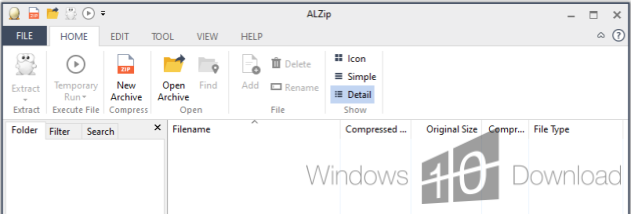

ALZip is a Windows archiving utility for compressing files and opening archive formats in one desktop application. It suits home users who need to package files for storage or sharing, as well as people who regularly receive archives created by different tools. Its interface supports common tasks such as creating an archive, extracting its contents and adding more files without requiring a separate program for each supported format.
The program can extract 36 archive formats, including ZIP, RAR and 7z, along with ISO and BIN image files. This broad format support is useful when a download or shared folder arrives in an unfamiliar archive type. For routine extraction, ALZip Speed Extractor can be enabled so an archive opens with a double-click. The standard workflow also keeps compression and extraction steps brief, making it practical for occasional users who do not need a complex archiving setup.
To create or update an archive, files can be added by dragging and dropping them into it. ALZip can also create self-extracting archives, which bundle an extraction mechanism with the compressed files so recipients can unpack them without first installing an archiver. For more advanced workflows, a command-line interface supports compression and extraction operations. A ZIP password recovery feature is available for archives whose password has been forgotten; it is intended for recovering access to ZIP files rather than serving as a general archive-management feature.
Typical uses include reducing file size for transfer, grouping documents into a single package, unpacking downloads, and opening disc-image archives. The range of supported formats can simplify these tasks when working with files from multiple sources, while drag-and-drop additions help when an existing archive needs to be updated. Its combination of a graphical interface and command-line operation accommodates both straightforward desktop use and scripted tasks.
ALZip is freeware from ESTsoft and is offered for Windows, including Windows 10 and Windows 11. The interface presents archive operations through a graphical workflow, with command-line access for users who prefer working from a terminal. It is a focused utility for handling compressed files rather than a general file-management application.