Application Mover x64
Application Mover x64 is a Windows utility for relocating installed ... space on one drive, reorganize program folders or move an installation to another hard disk without reinstalling ...

Application Mover x32 relocates installed programs to another folder on the same computer. It transfers files, updates matching Windows registry references and adjusts Start Menu shortcuts to point to the new location. The tool also checks INI and Install.log files for the old path. It is intended for moving applications between folders or drives, not cloning a system.
| Author: | Funduc Software |
| License: | Trialware |
| Price: | $15.00 |
| Released: | Apr 2, 2018 |
| File size: | 3.30 MB |
| Downloads: | 328 |
| Keywords: | update program registry paths, move installed programs, application relocation tool, move, easy-to-use interface, software relocation, move programs to another drive, efficient file transfer, program folder mover, transfer files, move software folders, Windows 10 compatibility, Funduc Software, mover, move folders, move files, Application Mover x32, transfer |
| Author URL: | https://www.funduc.com/ |
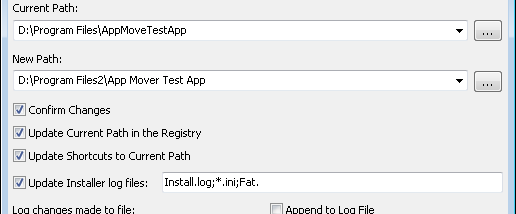

Application Mover x32 relocates installed programs to a different folder on the same computer. It is intended for users who need to reorganize disk space or move an application to another drive without reinstalling it. The program works with specified source and destination paths, and is designed for systems whose physical drives and drive letters remain unchanged.
To move an application, the user selects its current folder and the new destination. Application Mover transfers the files, then scans the Windows registry for references to the original location and updates them to the new path. It also adjusts path references in Start Menu shortcuts, helping those shortcuts continue to launch the relocated program. These changes address several common locations where an installed application's folder path is recorded.
The tool checks INI files and Install.log files in the original folder for strings containing the old path and replaces them with the destination path. A confirmation option allows changes to be reviewed before they are applied. If a file is in use and cannot be moved or updated immediately, the program can prompt for a reboot and complete pending changes after Windows restarts.
Application Mover is for moving applications between folders or drives on one computer, not for cloning a system or changing its physical drive arrangement. Relocation can affect software that relies on paths the tool does not update, so users should read the program's Important Notes and consider keeping a backup before proceeding. The 32-bit edition is trialware. It supports Windows Vista, Windows 7, Windows 8 and Windows 10; on Vista, it must be run with administrator privileges.