Speedtest4free
Speedtest4free is a free Windows desktop utility for checking internet connection performance. It measures download and upload speeds along with ping, giving home users and administrators ...

DownTester measures download speed by testing user-provided links in sequence, making it possible to compare performance across different servers. Each test can end after a set time or downloaded data amount. It saves results as text, HTML, XML or CSV, and can copy them to the clipboard. The URL list is saved for reuse.
| Author: | NirSoft |
| License: | Freeware |
| Price: | FREE |
| Released: | Jun 12, 2013 |
| File size: | 133 kB |
| Downloads: | 296 |
| Keywords: | NirSoft DownTester, ftp speed test, download test, Windows 10 compatible software, internet speed analysis, compare download speeds, download speed results, reliable performance, download speed, test, user-friendly interface, download, download speed testing, speed, test speed, internet speed tester, download speed test, download link tester |
| Author URL: | https://www.nirsoft.net/ |
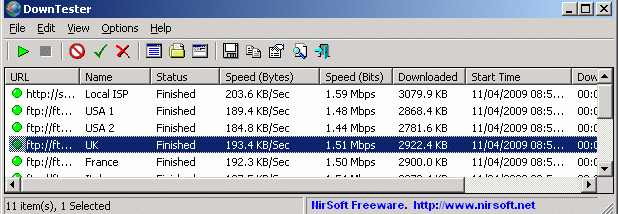

DownTester is a lightweight internet download-speed testing utility for users who want to compare connection performance across different servers. Instead of relying on a single built-in test server, it downloads files from URLs the user supplies, so results can reflect the route and server used. This makes it useful for checking an internet connection against an ISP-provided test file, comparing download sources in different locations, or repeating measurements under consistent conditions.
The program processes a list of download links automatically, testing each URL in turn. For each test, it can move on after a chosen number of seconds or after downloading a specified amount of data. These controls help adapt a run to different file sizes and testing needs: a time limit can keep tests brief, while a data limit can make downloads more comparable. Users can add URLs from a list or import them from a file, and DownTester saves the selected links in a configuration file for later sessions.
Results can be saved as text, HTML, XML or CSV files, copied to the clipboard, or pasted into applications such as Excel for review. Having several export formats makes it practical to keep a simple record, share results, or work with measurements in a spreadsheet. The URL list is deliberately supplied by the user rather than bundled as a universal set: using a shared set of test servers could concentrate traffic on the same hosts. Larger files are generally more suitable for measuring sustained download performance than very small files.
DownTester can also test FTP download links. FTP connections may use active or passive mode, and the mode can affect whether a test works through a firewall or what speed it measures. In active mode, the server initiates a connection back to the computer, which some firewalls block; passive mode has the computer initiate the connections. Network policies and traffic shaping can also cause FTP measurements to differ from downloads over ordinary web connections. Results therefore describe performance for the chosen URL and connection method, not necessarily the speed available from every server or location.
The utility is freeware from NirSoft and has a compact download size. Its documented operating-system support covers Windows XP through Windows 8, including the corresponding 64-bit editions where listed; Windows 10 and Windows 11 compatibility is not established here. DownTester is suited to users who can provide their own direct download links and want repeatable, exportable measurements rather than a one-click test against a fixed server.