FreeVimager for Windows 10 - Full description
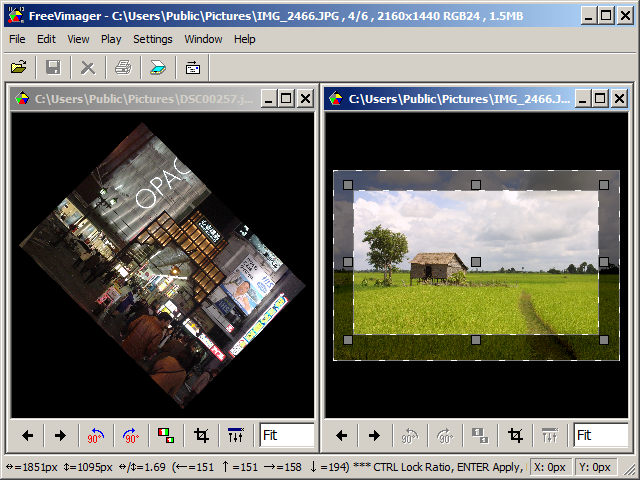
FreeVimager is a Windows image viewer and editor for people who want to browse pictures and make practical edits without using a complex graphics suite. Its straightforward interface keeps common tools close at hand, while tabs make it possible to open several files and switch between them in one window. Images can be opened by dragging them into the application or by browsing to their location.
The editor handles everyday adjustments such as cropping, resizing, rotating and flipping. Users can add borders, sharpen or soften an image, convert it to grayscale or negative, and reduce red-eye. A color-counting tool reports the number of unique colors in an image, and a screenshot function captures on-screen content. These tools suit quick corrections and simple image preparation rather than elaborate, layered artwork.
FreeVimager can also process groups of files. A batch job can be built from selected images or an entire directory, then used to rename files, convert formats, resize images, remove EXIF metadata or adjust image quality. Applying the same operation across a set can save time when preparing a collection for sharing, storage or publication. The viewer also offers a movable preview whose size and position can be adjusted to fit a preferred workspace.
Supported image formats include BMP, GIF, JPEG, TIFF, PNG, PCX, EMF, JXR, WebP, HEIC and AVIF. This broad format coverage is useful when browsing mixed image collections or converting files for use in other applications. The program combines viewing, basic editing and batch conversion in a single lightweight utility, making it suitable for home users and anyone handling routine image tasks.
FreeVimager is open-source software available at no cost for Windows 10 and Windows 11, as well as earlier Windows releases. It is offered in 32-bit and 64-bit builds where applicable. Its compact interface and focused toolset make it an option for users who need a viewer with editing and batch-processing functions without the extra complexity of a full professional editor.