Portable FlashFXP
Portable FlashFXP is a Windows file-transfer client for users ... and servers, or maintain remote backups. It supports FTP, FTPS and SFTP connections, bringing several common transfer ...

FTPGetter Professional Portable Edition is a portable Windows client for transferring files between local folders and FTP, SFTP or FTPS servers. It schedules recurring uploads and downloads, synchronizes files, and applies rules to existing destination files, such as overwriting, renaming or skipping them. Multiple connections can run at once, while logs and recovery features help track jobs and handle interruptions. The trialware edition can run from removable storage without a conventional installation.
| Author: | FTPGetter Team |
| License: | Trialware |
| Price: | $85.00 |
| Released: | Jan 1, 2026 |
| File size: | 10.60 MB |
| Downloads: | 1061 |
| Keywords: | portable, ftps transfer software, SFTP, synchronize, FTP Client, scheduling, sftp file transfer, FTP transfer, scheduled ftp uploads, download FTPGetter Professional Portable Edition, ftp client, file transfer, FTP, FTPGetter Professional Portable Edition free download, automated file transfers, automation, transfer, ftp synchronization, FTPGetter Professional Portable Edition |
| Author URL: | https://www.ftpgetter.com/ |


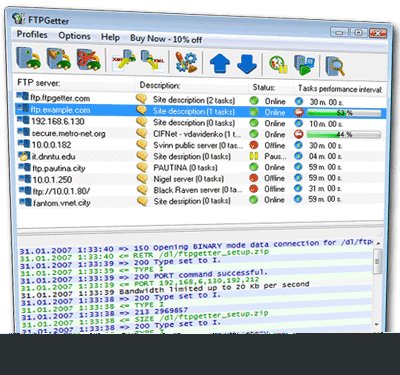
FTPGetter Professional Portable Edition is a Windows file-transfer client for individuals and organizations that move files between computers and FTP or SFTP servers. Its portable format lets it run from a USB drive or other removable storage without a conventional installation on each host computer, which suits administrators and staff working across multiple Windows systems. It combines manual transfers with scheduled tasks for recurring exchanges and synchronization.
The task scheduler lets users configure when transfers run, including recurring schedules, so routine uploads and downloads can proceed without being started by hand. Tasks can also synchronize files between locations. File-handling rules determine what happens when a file already exists at the destination: it can be overwritten, renamed or skipped. These options help match the transfer process to different workflows, such as publishing updated files or avoiding replacement of existing data.
For connections that require encryption, the client supports SFTP and FTPS as well as FTP. Multiple connections can run simultaneously, allowing work with more than one server or transfer at a time. Logging records transfer activity for later review, which can help with auditing and troubleshooting. Error-handling and recovery features address interruptions such as network failures, reducing the need to restart a transfer workflow from scratch.
The software is intended for people who regularly exchange files with remote servers, including teams maintaining website content, transferring business documents or keeping directories synchronized. A typical workflow involves setting up server connections, defining transfer tasks and schedules, then reviewing logs when a job needs attention. The portable edition can be carried between workstations, while scheduled automation is useful for recurring tasks that otherwise require repeated manual effort.
FTPGetter Professional Portable Edition is trialware. It is available for Windows 10 and Windows 11, as well as a range of Windows Server and earlier Windows versions. The portable design avoids the usual installation step, but the host computer still needs network access to reach the relevant servers. Transfer behavior depends on the selected protocol, server configuration and task rules, so connection details and file-handling options should be checked when setting up automated jobs.