USB Disk Storage Format Tool
Welcome to the home of the USB Disk Storage Format Tool, a powerful and efficient ... for Windows 10 users who frequently interact with USB storage devices. The USB Disk Storage Format Tool ...

ImageUSB is a freeware USB imaging utility for writing BIN or ISO images to flash drives, including multiple drives in one operation. It can also create an image from a USB drive and verify written data. Bit-level copying helps preserve boot information and drive contents, making it useful for preparing bootable media, duplicating recovery drives and distributing standardized USB setups.
| Author: | PassMark Software |
| License: | Freeware |
| Price: | FREE |
| Released: | Apr 15, 2025 |
| File size: | 2.30 MB |
| Downloads: | 457 |
| Keywords: | flash drive, usb duplication tool, clone USB drive, image, BIN writer, usb drive cloning, USB duplication, Image to USB, write, write iso to usb, ImageUSB, write USB images, write bin to usb, USB, x64 compatible software, create usb drive image, USB imaging tool, PassMark Software, usb image writer |
| Author URL: | https://www.passmark.com/ |

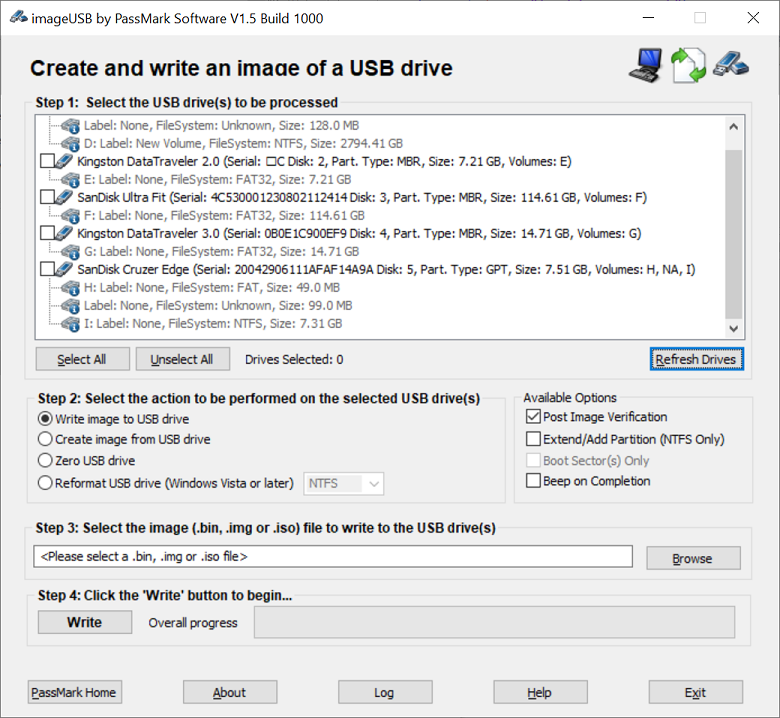



ImageUSB is a freeware utility from PassMark Software for writing disk images to USB flash drives and making exact copies of USB media. It is suited to IT staff, technicians, educators and others who need to prepare several drives from the same source or preserve a USB drive as an image. Its bit-level copying can retain boot-sector data and other drive contents, which is useful when a copy must behave like the original rather than contain only selected files.
The program can write an image file to one or more selected USB drives at the same time. Users choose the image, select the target devices and start the operation from the interface. This batch workflow reduces repetitive work when preparing installation media, distributing the same files to a group, or setting up multiple devices for a class or deployment. ImageUSB supports BIN and ISO image formats, allowing it to handle common USB imaging tasks without first extracting the image contents.
ImageUSB can also create an image from a USB drive, making it possible to save the device's contents for later writing or preservation. A verification option checks the written data against the source image, helping identify a copy that may not have completed accurately. Because writing an image replaces data on the target, users should select drives carefully and confirm that they have chosen the intended devices before starting. The tool works with USB flash drives and presents drive selection and imaging actions in a straightforward interface.
Typical uses include preparing bootable USB media, duplicating recovery or diagnostic drives, distributing a standardized set of files, and creating archival images for data preservation. Imaging is particularly useful when the drive's boot information and layout matter, since a file-by-file copy does not necessarily reproduce those details. The ability to target several drives in one operation is practical for repeatable deployments, while creating an image supports later reuse without needing to rebuild the contents manually.
ImageUSB is free to use and can run as a portable application, so it does not require a conventional installation and can be carried on a USB drive for use on different computers. It is intended for Windows and supports Windows 10 and Windows 11, as well as earlier Windows releases. The application is lightweight; the main requirement for the imaging task is enough USB capacity on each target drive to accommodate the image. Since it writes at the device level, it should be used with care around drives containing data that must be kept.