Archive Recovery
Welcome to the home of Archive Recovery, a state-of-the-art software solution developed by SysInfoTools Software, a trusted name in the world of Windows 10 applications. This powerful tool is designed to repair ...

J7Z is a graphical interface for creating, extracting and updating archives on Windows. It supports compression with 7-Zip, BZip2, Zip, GZip and Tar, and can unpack those formats plus RAR, ISO, CAB, RPM, DEB, ARJ, CPIO, CHM, LZH, NSIS, Z and split archives. Profiles and file lists help simplify repeat jobs, including backups of multiple folders. Protected archives are supported. J7Z is open source and requires Java Runtime Environment 1.8.
| Author: | Xavion |
| License: | Open Source |
| Price: | FREE |
| Released: | Apr 30, 2019 |
| File size: | 256 kB |
| Downloads: | 258 |
| Keywords: | extractor, compression, extract rar files, create compressed archive, j7z archive tool, Windows 10, Xavion, x64 software, compress file, data archiving, create archive, 7-zip archive, 7zip graphical interface, open source file archiver, archive backup profiles, J7Z, archive, file compression |
| Author URL: | https://xavion.name/ |
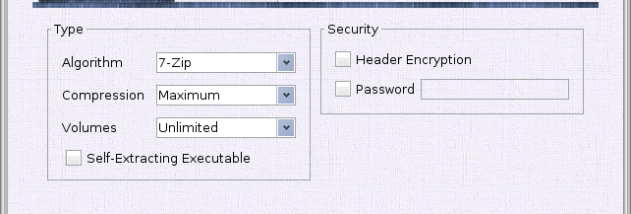

J7Z is a graphical interface for working with 7-Zip and other archive formats on Windows. It is aimed at people who want to create, extract and update compressed files without relying on command-line tools. The program supports a range of compression methods and provides reusable profiles and file lists for recurring archive tasks.
When creating archives, J7Z can use 7-Zip, BZip2, Zip, GZip and Tar compression. These options cover common needs, from sharing a ZIP file with other users to making a compressed backup. Existing archives can be updated, which is useful when adding or replacing files without rebuilding an archive from scratch. Protected archives can also be created, and J7Z can extract protected archives when the required password is available.
For extraction, the program handles 7-Zip, BZip2, Zip, GZip and Tar, along with formats such as RAR, ISO, CAB, RPM, DEB, ARJ, CPIO, CHM, LZH, NSIS, Z and split archives. This range lets users unpack files received from different sources through one interface. Archive profiles and lists help standardize repeated jobs, while support for backing up multiple folders to a storage location suits routine file-copy workflows.
J7Z can be used for everyday file sharing, organizing downloaded archives and maintaining compressed backups. A profile can retain preferred settings for a recurring job, while a list helps apply an archive task to multiple items. These features are particularly useful when the same folders need to be archived regularly or when archive settings should remain consistent between runs.
J7Z is open-source software and requires Java Runtime Environment 1.8. It is intended for Windows, including Windows 10 and Windows 11, and also supports older Windows releases. Its archiving capabilities rely on the supported formats and methods; it is a practical front end for common compression and extraction tasks rather than a file-management suite.