Network Drive Manager
Welcome to the download page for the Network Drive Manager, a cutting-edge software developed by Suncross. This Windows 10 compatible software is your ultimate solution to managing network ...

LAN Speed Test checks file-transfer speeds on local drives, USB storage, and network shared folders. It writes and reads a test file created in memory, then calculates throughput in both directions. Results can be viewed in several units, and advanced features include packet-level charts, automated repeat tests, CSV logging, email reports, network scanning, and command-line controls. Lite mode supports basic testing without a time limit.
| Author: | Totusoft |
| License: | Demo |
| Price: | $10.00 |
| Released: | Feb 19, 2019 |
| File size: | 17.10 MB |
| Downloads: | 473 |
| Keywords: | network speed tester, lan speed test, LAN Speed Test, network transfer speed, speed tester, network, Totusoft, shared folder speed test, Network Performance, LAN, lan throughput monitor, LAN speed, Internet Speed Analysis, x64 Software Review, usb drive speed test, Windows 10 Compatible, speed, network speed, tester |
| Author URL: | https://totusoft.com/ |


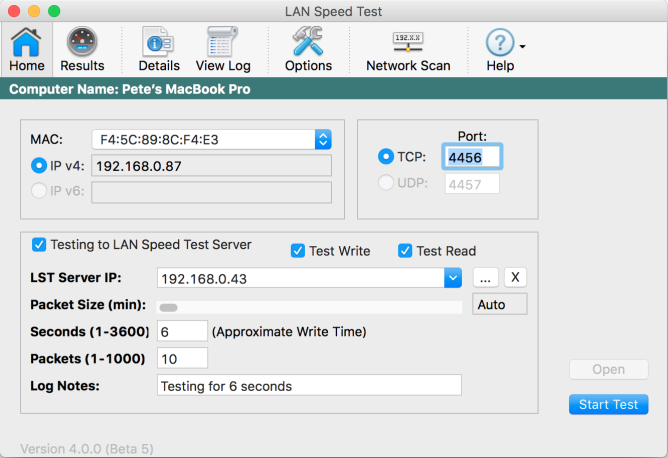

LAN Speed Test measures file-transfer performance on local drives and networks. It is intended for users diagnosing slow storage, checking wired or wireless LAN throughput, or comparing network performance across computers. The program can test a folder on a hard drive or USB drive, as well as a shared folder on a local network. Its Lite mode provides functional testing without a time limit, while some advanced tools are reserved for the full feature set.
To run a test, the user selects a destination folder and chooses the amount of data to transfer. LAN Speed Test creates the test file in memory, writes it to the selected location, reads it back, and calculates the transfer rates. It records the time taken in both directions, helping distinguish upload and download performance. Tests can be cancelled while running, and a progress bar shows their status. Results can be displayed in different throughput units, including Mbps, MBps, and Gbps.
For network measurements that avoid the limits of the destination computer's storage, the program can work with LAN Speed Test Server. This sends test data between the computers' memory, reducing the effect of hard-drive performance on the result. Users with multiple network adapters can select which interface to use. Advanced results include average, minimum, and maximum throughput, along with per-packet details or a chart. Test size and chunk size can also be adjusted for more controlled measurements.
Additional tools support repeated testing and record keeping. Tests can run automatically at intervals, with results saved to a configurable CSV log that can be opened in the built-in log viewer or imported into spreadsheet and database workflows. Results can also be emailed manually or automatically, including an option to send them when performance falls below a chosen speed. A network scan helps identify devices on the local network and keep notes about them. Command-line controls and a command-line builder support scripted or repeatable testing.
LAN Speed Test is portable and can run from a computer, USB flash drive, or network share without installation. Its tests are designed to finish quickly, although duration depends on the selected data size and connection. Lite mode suits basic drive and shared-folder checks; users needing server-based tests, detailed reports, automation, or other advanced tools can use the full feature set under the demo license. The program is intended for Windows systems, and the available feature set may depend on the mode in use.