Bookmarks Commander for Firefox for Windows 10 - Full description
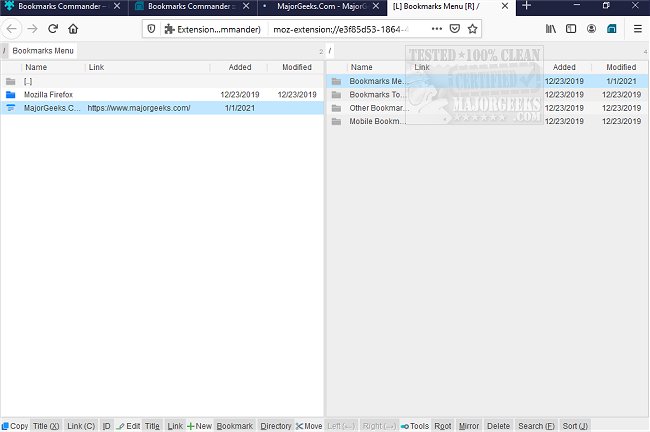
Bookmarks Commander for Firefox is an in-browser bookmark manager for people who have accumulated large collections of saved websites and want a more structured way to work with them. Rather than replacing Firefox's built-in bookmark tools, it provides a separate, commander-style interface with two panels. The extension opens in its own tab from a toolbar icon, so bookmark organization stays within Firefox and does not require a separate desktop application.
The two-sided layout presents bookmark folders and their contents in parallel, giving users a way to navigate collections without relying on a single tree or list. The root view includes Firefox's standard bookmark areas, such as the bookmark menu, toolbar, mobile bookmarks and other bookmarks. Users can move through folders, return to the root directory and mirror one panel's location in the other. These controls are useful when reviewing different parts of a collection or preparing to reorganize saved links.
Bookmarks Commander supports creating folders and bookmarks, editing bookmark titles and links, and deleting entries. Its lower command area exposes actions for working with the selected item, including sending its title, ID and URL. Bookmarks can also be sorted alphabetically, while the built-in search helps locate particular entries and identify duplicates. Together, these tools help users find outdated or repeated links and bring a large collection into a more consistent order.
The extension suits users who prefer a file-manager-like approach to organizing web links, including people who keep separate folders for projects, research or frequently visited sites. It can be used alongside Firefox's regular bookmark manager, so existing browser workflows remain available. The two-panel design offers an alternative view for maintenance tasks, while search and sorting help with collections that are difficult to browse manually.
Bookmarks Commander is open-source software and is available at no cost. The Firefox add-on requests browser permissions during installation and operates as part of the browser rather than as an independent program. It is offered for Windows 10 and Windows 11 systems, including 32-bit and 64-bit editions. The extension does not support dragging bookmarks from one panel to the other, so moving entries between folders relies on its available commands and navigation controls.