Tune Sweeper
... finding and managing duplicate tracks in an iTunes music library. It groups matching entries so users can ... rather than treating every result as an interchangeable file. The detailed information shown for each track helps ...

Music Tag Tool edits tags and embedded artwork in MP3, WMA, M4A and iTunes AAC files. It can search online for missing or incorrect track details, including artist, album, track number, genre and year, and apply the information to multiple files. Users can select album covers, edit tags manually, or drag audio files from iTunes into the program. It requires .NET Framework 4.
| Author: | Wide Angle Software Ltd. |
| License: | Demo |
| Price: | $19.99 |
| Released: | Sep 8, 2020 |
| File size: | 6.60 MB |
| Downloads: | 549 |
| Keywords: | Tag Editor, itunes tag editor, music tag editor, Tag Modifier, batch tag editing, album art editor, edit, album, file, music library organizer, album artwork finder, batch music tagging, tag, audio metadata editor, Music Tag Tool, music, edit mp3 tags, Wide Angle Software Ltd, ID3 Editor |
| Author URL: | https://www.wideanglesoftware.com/ |
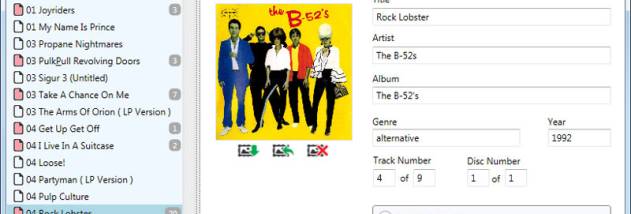

Music Tag Tool is a desktop utility for correcting and completing the information stored in digital music files. It is intended for listeners who want an organized music library, especially when tracks have missing artist or album names, incorrect numbering, or no embedded cover image. Rather than updating details only in a separate catalog, the program can write tag data and artwork directly into supported audio files.
The software works with MP3, WMA, M4A and iTunes AAC files. It can search online for missing or incorrect track information, including artist, album, track number, track count, genre and year, then apply the results to the files. This is useful when building a library from files with incomplete tags: automatic lookup can fill in common fields, while manual editing lets users review or adjust the information before saving it. Multiple tracks can be handled together, reducing the need to open and update each file individually.
Music Tag Tool also searches the web for album artwork and saves a selected image inside the music file. When more than one image is available, users can choose which cover to embed. Artwork stored with a track can appear in compatible music players, including portable devices that display embedded album covers. Users can also edit artwork manually, so an existing image can be replaced or a missing cover added as part of the tagging process.
For an iTunes-based workflow, audio files can be dragged from iTunes into the program for editing. Batch editing and multi-file information lookup help when organizing whole albums or larger collections, and the program can search for missing artwork across multiple files in one operation. These features make it suitable both for occasional cleanup of a few songs and for maintaining a library where naming, numbering and cover art need consistent attention.
Music Tag Tool is commercial software offered as a demo. It requires .NET Framework 4 and is available for Windows, including Windows 10 and Windows 11. Supported file types are MP3, WMA, M4A and iTunes AAC; other audio formats are not listed as supported. The program focuses on tag information and embedded artwork rather than audio playback or music library management.