Net Monitor

Net Monitor 1.001

See which programs access the internet.

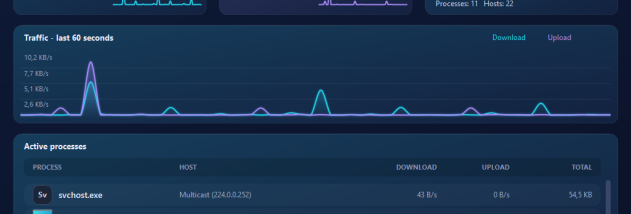
Net Monitor shows which programs on your PC access the internet - with data volume, destination host, port and time, clearly sorted by process. Live charts and a radar view display current activity, while the log lets you look back at what happened earlier. New programs that connect for the first time are reported by popup, so you can spot unexpected connections, background services and telemetry immediately.

Net Monitor 1.001 details

Author:
License: Freeware
Price: $24.90
Released:
File size: 7.21 MB
Downloads: 0
Keywords: network monitor, internet connections, process monitor, network traffic, bandwidth monitor, connection logger, firewall companion, privacy, telemetry, background connections, data usage per program, network security, traffic monitor, host lookup
Author URL: https://www.ascompsoftware.com
Net Monitor screenshot
Net MonitorNetwork MonitoringWin2000, Windows XP, Windows 7 x32, Windows 7 x64, Windows 8, Windows 10, WinServer, WinOther, Windows 2000, Windows 2003, Windows Server 2000, Windows Server 2003, Windows Server 2008, Windows Server 2008r2, Windows Server 2012, Windows Tablet PC Edition 2005, Windows Media Center Editi

User Rating: 0 (0 votes)

Windows 10

x32

Windows 10

x64

Net Monitor for Windows 10 - Full description

Net Monitor by ASCOMP is a user-friendly Windows tool that shows you which programs on your PC access the internet - and how much data they send and receive. Many applications, background services and system components communicate with servers without you noticing. Net Monitor makes these internet connections visible, so you always know who talks to whom and when. For every process, Net Monitor logs the data volume in both directions, the destination host, the port and the time of the connection. Thanks to Windows event tracing (ETW), recording starts immediately and needs no driver. The modern dark interface shows current activity with glowing real-time charts, lists all active processes and assigns the hosts to each program. The radar view displays every active program as a glowing circle whose size reflects its current data volume, so the biggest data consumers stand out at once. If a program that has never been seen before uses the network, Net Monitor reports it with a popup in the bottom right corner - so you can react to unexpected connections right away. The history lets you look back at what happened earlier: select a date and time, and Net Monitor shows the processes, hosts and data volume of that period. Net Monitor runs in the notification area, can be started automatically with Windows and is available in German, English and Spanish. The free Standard Edition already offers all core functions for private use and keeps a history of up to 30 minutes. The Professional Edition additionally keeps the history for up to 30 days - so you can also see what happened last night - and is licensed for business use.

Net Monitor for Windows 10 - Post your review