NetTraffic
... for anyone looking to monitor and analyze their network traffic in real-time. NetTraffic is a lightweight, yet ... even predict future usage based on your past activity. This software is perfect for both personal and ...

Network Activity Indicator adds a blinking network icon to the Windows system tray, showing when data is being sent or received. Clicking the icon opens a window with byte counts for outgoing and incoming traffic. It supports wired and wireless connections and runs as a lightweight background utility. The program offers a quick status check rather than bandwidth controls or advanced traffic analysis.
| Author: | Igor Tolmachev |
| License: | Freeware |
| Price: | FREE |
| Released: | Mar 2, 2026 |
| File size: | 143 kB |
| Downloads: | 474 |
| Keywords: | internet activity monitor, Network Activity Indicator, Activity Indicator, Network Traffic, Network Indicator, IT Samples, Network Activity, bytes sent received, Indicator, System Tray Tools, Igor Tolmachev, network status utility, Internet Traffic Monitoring, system tray network icon, Network Connection Status, Activity, network traffic monitor, network activity indicator |
| Author URL: | http://www.itsamples.com |

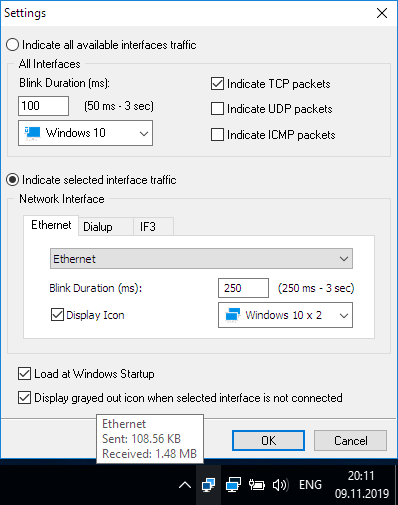
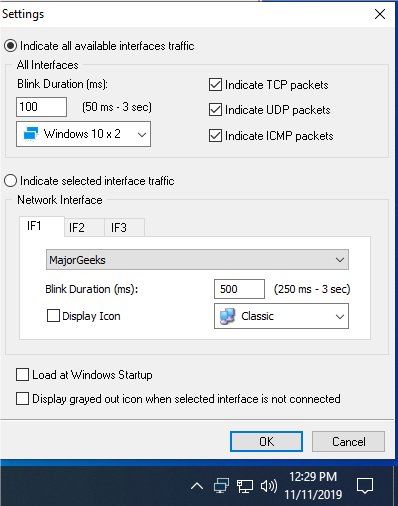



Network Activity Indicator is a small Windows utility for people who want to see whether their computer is sending or receiving data without opening a network monitor. It places an activity icon in the system tray, where blinking provides a quick visual signal of network traffic. The tool brings back the kind of tray indicator found in older Windows environments, giving users a simple way to check activity while working on the desktop.
The icon signals both incoming and outgoing traffic. This makes it useful for a quick check when a download, upload, browser page or connected application appears to be working: the indicator can show whether data is moving even when the relevant window is not in view. It can also draw attention to network activity when the computer seems idle. The visual cue is an at-a-glance status aid, rather than a diagnosis of what is generating the traffic or whether a connection is performing normally.
Clicking the tray icon opens a window with more information, including the number of bytes sent and received. These figures give users a basic view of data transfer beyond the blinking signal and can help distinguish incoming from outgoing use. The utility supports wired and wireless connections, so the indicator can be used on systems connected through either type of network. Its presentation stays centered on a compact tray icon and a straightforward detail window, rather than a larger dashboard.
Network Activity Indicator is suited to users who want lightweight visibility into everyday network activity, including people checking whether a transfer is still underway or looking for an unexpected burst of traffic. It runs in the background and is designed to use few system resources, making it suitable as a persistent desktop indicator. It does not manage network connections, limit bandwidth or provide advanced traffic analysis; users who need those functions will need a more comprehensive monitoring tool.
The program is freeware and supports Windows 10 and Windows 11, as well as Windows 7 and Windows 8 in 32-bit and 64-bit editions. Setup requires little configuration, after which the indicator is available from the system tray. Its focused scope makes it most appropriate as a supplementary status utility for users who prefer a visible, simple signal over detailed network reports.