Network Drive Manager
Welcome to the download page for the Network Drive Manager, a cutting-edge software developed by Suncross. This Windows 10 compatible software is your ultimate solution to managing ...

NetworkLatencyView monitors active TCP connections and calculates latency from the time a packet takes to receive an acknowledgement. Its table shows details such as IP address, hostname and average latency, with support for IPv4 and IPv6. Users can export connection statistics as CSV, XML or HTML for reporting and further analysis. This lightweight freeware utility is suited to network troubleshooting and monitoring.
| Author: | Nir Sofer |
| License: | Freeware |
| Price: | FREE |
| Released: | Oct 31, 2025 |
| File size: | 102 kB |
| Downloads: | 159 |
| Keywords: | Latency, Latency Calculator, network monitoring, Nir Sofer, Network, ipv4 latency monitor, TCP, connection latency analyzer, tcp latency monitor, export network statistics, Calculator, latency analysis, Windows utility, tcp connection statistics, network latency tool, Calculate Latency, packet loss, Windows 10, NetworkLatencyView, Network Monitor, NetworkLatencyView free download, download NetworkLatencyView, real-time performance |
| Author URL: | http://www.nirsoft.net/ |

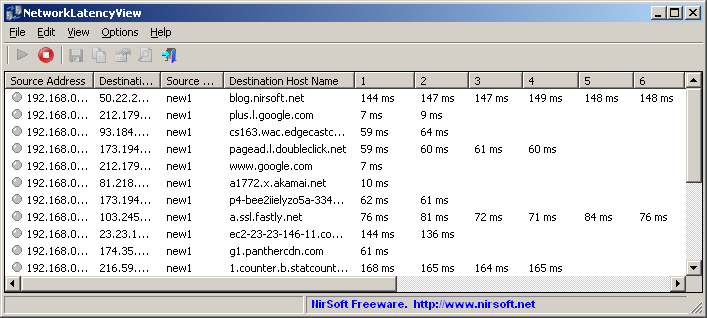


NetworkLatencyView is a lightweight Windows utility for examining the latency of active TCP connections. It is intended for network administrators, IT support staff and technically minded users who need connection-level measurements while troubleshooting or monitoring a network. Rather than testing a single destination with a separate ping command, it observes TCP traffic and presents latency statistics for connections detected on the system.
When the utility runs, it captures TCP connections and displays their details in a table. For each connection, the table includes information such as the IP address, hostname and average latency. Latency is calculated from the time it takes for a TCP packet to receive an acknowledgement, providing a measurement tied to the observed connection. The continuously updated view helps users compare connections and spot changes while applications are communicating over the network.
NetworkLatencyView supports IPv4 and IPv6, making it useful on networks that use either protocol. Its tabular presentation keeps connection details together for inspection, while export options allow results to be saved as CSV, XML or HTML. These files can be used in spreadsheets, kept as troubleshooting records, shared with colleagues or processed with other tools. Exporting is also useful when measurements need to be reviewed after a monitoring session rather than only while the program is open.
Typical uses include investigating slow or inconsistent connections, checking latency associated with particular network activity and collecting data for a support report. It can help narrow down which active TCP connections show higher average delay, but it is a focused monitoring utility rather than a complete network diagnostic suite. The measurements are most useful to people comfortable interpreting IP addresses, hostnames and TCP connection data; they should be considered alongside other network checks when identifying the cause of a problem.
The program is freeware from Nir Sofer and is designed to use few system resources, so it can run alongside other applications during monitoring. It is available for Windows, including Windows 10 and Windows 11, as well as several earlier Windows releases. Its small size and focused interface suit quick checks as well as longer observation sessions, with exported files providing a way to retain or share the resulting statistics.