Directory Lister
Welcome to the home of Directory Lister, an innovative software developed by the renowned KRKsoft. ... listings on your Windows 10 system. With Directory Lister, you can easily generate, print, and save detailed ...

NTFSLinksView scans a selected folder for NTFS symbolic links and junction points, then displays their target paths. It opens with the user profile folder and can scan other locations, including a whole drive with infinite subfolder depth. Results can be exported as text, HTML, XML or CSV. The freeware runs from its executable without installation or additional DLL files.
| Author: | NirSoft |
| License: | Freeware |
| Price: | FREE |
| Released: | Nov 13, 2023 |
| File size: | 51 kB |
| Downloads: | 237 |
| Keywords: | NTFS link, NTFS symbolic link, symbolic link viewer, ntfs link viewer, ntfs link list, NirSoft development, symbolic link, export ntfs links, Windows 10 compatibility, x64 software review, NTFSLinksView utility, junction point viewer, find ntfs junctions, lister, NTFS link viewer, hard link finder, NTFS symbolic junction |
| Author URL: | https://www.nirsoft.net/ |
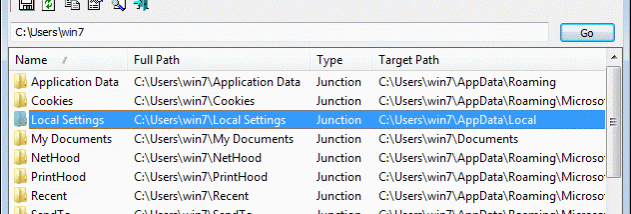

NTFSLinksView is a lightweight utility for inspecting symbolic links and junction points in the NTFS file system. It is useful to Windows users who need to see where these links are present and which files or folders they point to, including links involved in Windows folder layouts and application compatibility.
The program scans a chosen folder and displays the NTFS symbolic links and junctions it finds, along with their target paths. On startup, the default view covers the user profile folder. To inspect another location, enter its path and start the scan. The folder scope can include subfolders; selecting infinite subfolder depth allows a scan from a drive root, such as C:.
Results can be saved as text, HTML, XML or CSV files. These formats make it possible to keep a record of links, review the findings outside the program, or use the exported data in other tools and workflows. The listing focuses on link locations and destinations, helping distinguish a real folder from a link that redirects access elsewhere.
NTFSLinksView runs directly from its executable and requires no installation or additional DLL files. It is freeware for Windows, including Windows 10 and Windows 11. It is intended for viewing and exporting link information rather than creating or changing symbolic links and junctions.