Disk Savvy
Disk Savvy is a disk space analyzer for Windows that shows how storage is ... or narrowed to a specific area. After a scan, Disk Savvy reports the number of files and the ...

Osenpa Disk Analyzer scans drives and partitions to show how files and folders contribute to occupied storage. It automatically checks for low-space volumes and supports manual scans for more detailed reports. File-size filters and dynamic searches help locate large or specific items, while selective cleanup can remove chosen temporary, cached or other space-consuming data. A cleanup report summarizes the addressed areas. The freeware runs on 64-bit Windows 10 and Windows 11.
| Author: | Osenpa |
| License: | Freeware |
| Price: | FREE |
| Released: | Oct 8, 2026 |
| File size: | 156.00 MB |
| Downloads: | 56 |
| Keywords: | disk space, occupancy, download Osenpa Disk Analyzer, Osenpa Disk Analyzer free download, disk usage scanner, Osenpa Disk Analyzer, clean, temporary file cleaner, clean temp data, find large files, disk, storage cleanup utility, partition space analyzer, disk space analyzer, storage occupancy, space |
| Author URL: | https://osenpa.com/osenpa-auto-clicker |


Osenpa Disk Analyzer is a Windows utility for examining how files and folders use space on a computer's drives and partitions. It is suited to people who need to locate storage bottlenecks, review low-space volumes or decide which areas may be worth cleaning. Rather than showing only a drive's total capacity and remaining space, it scans directory contents to identify large items and provide a more detailed view of occupied storage.
After launch, the program runs a default scan and can notify users when a partition is approaching a critical low-space state. For a closer inspection, a manual scan can target a preferred disk or partition. The resulting report presents files and folders alongside their contribution to used space, helping users compare storage-heavy areas and trace consumption from a volume down to its contents.
Filters and dynamic searches narrow the results to items that match a particular review. A file-size filter can focus attention on files above a chosen threshold, while searches help find specific data across the scanned results. These tools make it easier to distinguish substantial storage consumers from smaller items and to investigate a drive without relying on its overall capacity figure alone.
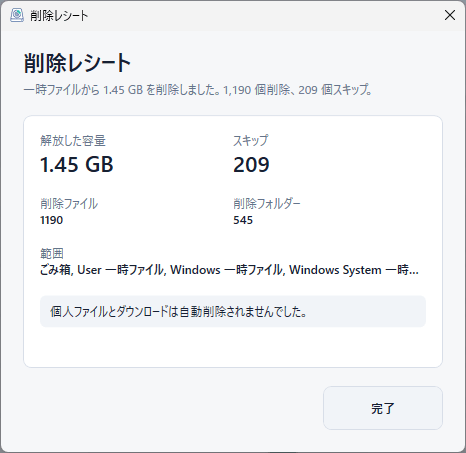
The analysis also supports selective cleanup. Users can choose items identified during the review, including temporary or cached data and other space-consuming areas, rather than treating an entire drive as a single cleanup target. Once cleanup is complete, the program produces a report of the addressed areas, providing a record of what was selected and helping users assess the result. This scan, filter, select and review workflow can be useful for routine maintenance as well as when a system reports that a drive is nearly full.
Osenpa Disk Analyzer is freeware for 64-bit Windows 10 and Windows 11 systems. Its purpose is disk-space analysis and cleanup, so reviewing scan results before removing selected data is a sensible part of the workflow, particularly when files are unfamiliar. The program can help identify where space is being used, but deciding whether particular files should be kept remains the user's responsibility.