Portable Trout for Windows 10 - Full description
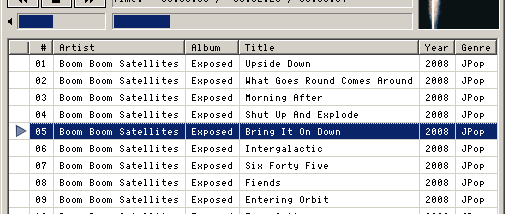
Portable Trout is a lightweight audio player for listeners who want to load and play music without the complexity of a large media library application. Its broad format support and use of embedded tags make it suitable for mixed collections, while straightforward playback modes and standard controls keep everyday listening simple. It also handles internet radio and audio CDs, extending it beyond local music files.
The player opens common formats including MP3, WAV, OGG, AIFF, MP1 and MP2, as well as tracker music such as MOD, XM, S3M and IT. Additional formats - including FLAC, WMA, MIDI, AAC, MP4, APE, AC3, TTA and MPC - are available through plugins. Trout reads a range of tag types, including ID3, Vorbis comments, WMA, APEv2 and tags used by MP4, ALAC and AAC files. This lets it display track information from varied collections rather than relying only on filenames. Basic tag editing is also available.
Playback can be set to play a file or playlist, repeat a track or list, shuffle, or select tracks randomly. Basic freeDB support can retrieve audio CD track titles, and internet radio streams can be played alongside stored audio. For compact access, horizontal and vertical minibar controls provide a smaller playback interface, while a toaster-style popup can show track changes. Basic folder.jpg album art support adds cover images where that convention is used.
Trout offers several ways to fit into existing listening and control setups. A customizable hotkey system can trigger player actions, and command-line switches support play, stop, previous, next and mute operations from external tools. WinampAPI support enables external control and display, while track announcements can speak track information, a useful option for audiobook listening. Last.fm and Libre.fm scrobbling are supported for logging listening activity.
Portable Trout is freeware and was developed with Windows in mind; Windows 10 is among the supported systems. Some features depend on plugins, and tag editing and certain tag formats have platform limitations. Its focus is audio playback rather than video or a comprehensive media-management library, making it a practical choice for users who value broad audio compatibility, tags and direct playback controls.