Xinorbis
Xinorbis is a disk-usage analyzer for people who need a detailed picture of ... the clipboard. For cleanup and ongoing maintenance, Xinorbis can find duplicate files by name and size, and display files according ...

Portable Xinorbis analyzes hard disks, folders, removable drives and mapped network drives, presenting file distribution through graphs, tables and tree views. Results can be sorted by type, size, owner, attributes or date. It also finds duplicates by name and size, compares scans with Folder History, and exports customizable reports to HTML, ASCII, CSV or XML.
| Author: | Paul Alan Freshney |
| License: | Freeware |
| Price: | FREE |
| Released: | Feb 26, 2020 |
| File size: | 12.00 MB |
| Downloads: | 280 |
| Keywords: | file distribution, folder size analysis, file distribution report, analysis, graphical representation, find duplicate files, portable disk analyzer, analyzer, Portable Xinorbis, analyze drive, HDD analyzer, disk space analyzer, file distribution statistics, hard drive analysis, analyze, Paul Alan Freshney, system optimization, disk analysis |
| Author URL: | http://maximumoctopus.com/ |
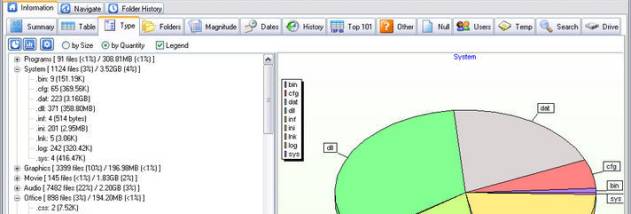

Portable Xinorbis is a disk-space analysis utility for users who need to understand what is stored on a hard disk, folder, removable drive or mapped network drive. It scans selected locations and presents their contents through graphs, tables and tree views, helping users examine both the overall structure and the distribution of files. A scan can cover one location or combine several locations in a single report, which is useful when comparing storage across drives or folders.
Results can be organized by file type, attributes, size, owner or date. These views help locate large files, see which kinds of data occupy the most space, and inspect how files are distributed across a directory structure. The built-in search tool finds items within the scanned contents, and search results can be saved to a file or copied to the clipboard. Xinorbis can also identify duplicate files by name and size, making it easier to review repeated items when managing a crowded drive.
Folder History records scans so users can compare the contents of a folder or drive at different times. This makes changes in file distribution easier to review without relying on a single snapshot. Xinorbis also creates customizable reports, with export options including HTML, plain ASCII text, CSV and XML. Reports and tables can be saved for later comparison or included in other documents, allowing the analysis to support record keeping and further review. Windows Explorer shell support provides a way to start a scan of a directory from Explorer.
The program is suited to home users and administrators who want a detailed inventory of storage contents, need to investigate where disk space is going, or want reports for multiple locations. Its different result views serve both quick checks, such as finding the largest files, and more structured analysis of file types, ownership and dates. Duplicate detection and saved reports can also assist with routine storage reviews, while Folder History helps identify how a scanned location has changed between analyses.
This portable edition is distributed as a ZIP archive for users who want to control where the program is kept, including use from a USB flash drive. It is freeware for Windows. Xinorbis can scan local folders and drives as well as mapped network drives, and its report formats make results usable in other tools or documents. The portable setup is an alternative to the separate installer edition; the program's help pages provide guidance on its portable operation.