PuTTY Key Generator
PuTTY Key Generator, developed by Simon Tatham, is an ... and security-conscious users alike. With its intuitive interface, PuTTY Key Generator allows you to create both RSA ...

PuTTY is a terminal emulator and network client for connecting to remote computers through SSH, Telnet, Rlogin, serial or raw connections. Its xterm-style terminal supports interactive command-line work, while saved sessions make repeat connections easier. Companion tools handle file transfers and scripted connections.
| Author: | Simon Tatham |
| License: | Open Source |
| Price: | FREE |
| Released: | Apr 15, 2024 |
| File size: | 3.50 MB |
| Downloads: | 1341 |
| Keywords: | ssh file transfer tools, SSH client, Telnet, PuTTY Configuration, client, Terminal Emulator, SSH, remote shell client, serial terminal client, Secure File Transfer, telnet client, ssh terminal emulator, free SSH client, Telnet client, putty ssh client, Network Protocol, Simon Tatham |
| Author URL: | https://www.chiark.greenend.org.uk/ |
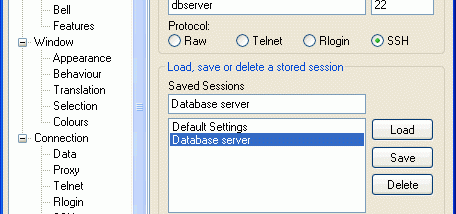

PuTTY is a terminal emulator and network client for connecting to remote computers over SSH, Telnet, Rlogin or a serial connection. It is used by system administrators, developers and other users who need to work with command-line tools on another machine. Rather than displaying a remote desktop, PuTTY provides a text-based session: commands entered in its terminal are sent to the connected system, and the system's responses appear in the window.
SSH is the main choice for secure remote shell access. PuTTY establishes a connection to an SSH server, then provides an interactive terminal for managing files, running programs or configuring services. It supports authentication with passwords or public keys, and can save connection settings for repeated use. Telnet and Rlogin are available for compatible systems and services, while a raw connection mode can connect to a specified network socket without applying a higher-level protocol.
The terminal window emulates xterm, allowing text-based applications to run in a familiar terminal environment. Users can adjust session options such as the connection protocol, host and terminal behavior before connecting, and save sessions for later. SSH port forwarding can carry other network traffic through an encrypted connection, which is useful when accessing services that are otherwise available only on a remote network. PuTTY also works with companion command-line tools: PSCP transfers files, PSFTP provides interactive file transfer, and Plink supports scripted or command-line connections.
Typical uses include administering Linux and Unix servers from a Windows PC, opening a shell on a network device, accessing a Telnet-based service, and transferring files to or from a remote host with the related utilities. Multiple sessions can be opened independently, letting users connect to different hosts or services as needed. A connection requires a reachable server or device that accepts the selected protocol; PuTTY itself does not provide the remote service.
PuTTY is open-source software and is available for Windows, with versions also available for Unix platforms. It supports Windows 10 and Windows 11 as well as older Windows releases. SSH and other encrypted features are subject to local laws, which can vary by country; users should check applicable rules before using encryption. The Telnet protocol does not encrypt session data, so it is generally unsuitable for sending sensitive information over untrusted networks.