SharedSafe
... and encrypted file transfers, real-time collaboration, and effortless synchronization across multiple devices. Download SharedSafe now and safeguard your valuable data with ease. ...

Sync Breeze Server is Windows software for centrally managing file synchronization between local folders and network shares. Administrators configure source and destination locations, then run jobs on a schedule or use real-time synchronization to keep selected data up to date. Filtering and task status tools help control transfers and review activity. It is intended for organizations that manage shared files on Windows systems, not as a cloud storage service.
| Author: | Sync.com Inc |
| License: | Trialware |
| Price: | $6.00 |
| Released: | Mar 25, 2026 |
| File size: | 72.30 MB |
| Downloads: | 322 |
| Keywords: | windows file sync software, data synchronization, sync files between folders, synchronize directory, backup, x64 architecture, scheduled file synchronization, server-based solution, synchronization, Sync Breeze Server, network share synchronization, real time file sync, file synchronization, network synchronization, Windows 10 software, file synchronization server, Flexense Computing Systems Ltd, copy |
| Author URL: | https://www.sync.com/ |

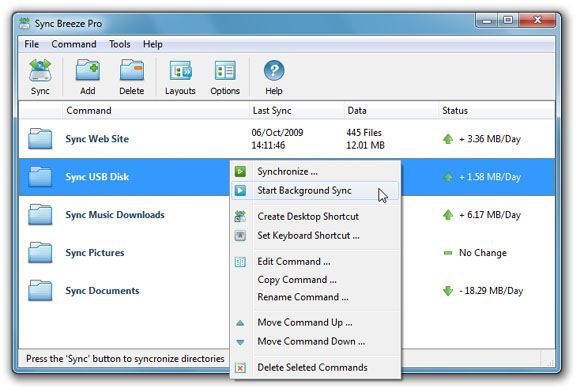





Sync Breeze Server is Windows file synchronization software for administrators and organizations that need to copy and keep files aligned across storage locations. It is designed for server-based use, where synchronization can be managed centrally rather than performed manually from individual workstations. Typical sources and destinations include local folders and network shares, making it useful for routine data movement within an office or across connected systems.
The program can synchronize files between selected directories, helping maintain matching copies of working data or move files to a designated destination. Administrators configure the source and target locations, then choose how and when the synchronization task should run. Scheduled jobs suit recurring maintenance, while real-time synchronization can handle changes as they occur. These options help reduce manual copying and keep shared data current across storage locations.
Sync Breeze Server also supports filtering and task configuration so synchronization can be limited to the files relevant to a particular workflow. Rules can help exclude unwanted content or focus on selected file types, while status information gives administrators a way to review task activity and identify problems. Multiple jobs can be configured for different folders or purposes, such as distributing project files, maintaining a secondary copy, or updating data shared by a team.
The server edition is suited to environments where file transfers need ongoing oversight, including office networks and organizations that manage shared folders on Windows systems. It can be used for recurring synchronization between departmental shares, transferring updated files to another storage location, or keeping selected directories aligned between systems. It addresses file synchronization rather than providing cloud storage, online document editing, or a general-purpose cloud backup account.
Sync Breeze Server is trialware and is intended for Windows. The supported systems include Windows 10 and Windows 11, as well as Windows 8; both 32-bit and 64-bit editions are supported where indicated. Server-based synchronization requires access to the folders and network locations involved, along with appropriate permissions to read and write their contents. Administrators should test task settings with representative data before relying on automated synchronization for important files.