X-Proxy
... your online privacy and security. X-Proxy is a Windows 10 compatible application that allows you to surf the web anonymously, thereby protecting your personal information ...

TV-Browser is a free, open-source digital TV guide that downloads schedules from the internet and displays them in a clear, printed-guide-style layout. It supports more than 500 channels, allowing viewers to browse and compare broadcasts in one place. Skins, icons, and plugins provide ways to customize or extend the application. TV-Browser does not play television; an internet connection is needed to update listings, and Java is required to run the program.
| Author: | Sourceforge |
| License: | Open Source |
| Price: | FREE |
| Released: | Dec 28, 2022 |
| File size: | 27.90 MB |
| Downloads: | 702 |
| Keywords: | Sourceforge, Electronic Program Guide, digital tv listings, tv program, online tv program guide, tv guide software, guide, Open-source application, x64 software, tv schedule guide, TV-Browser, online TV, online tv guide, open source tv guide, digital tv guide, Windows 10 compatible, browser, tv channel listings |
| Author URL: | https://sourceforge.net/ |

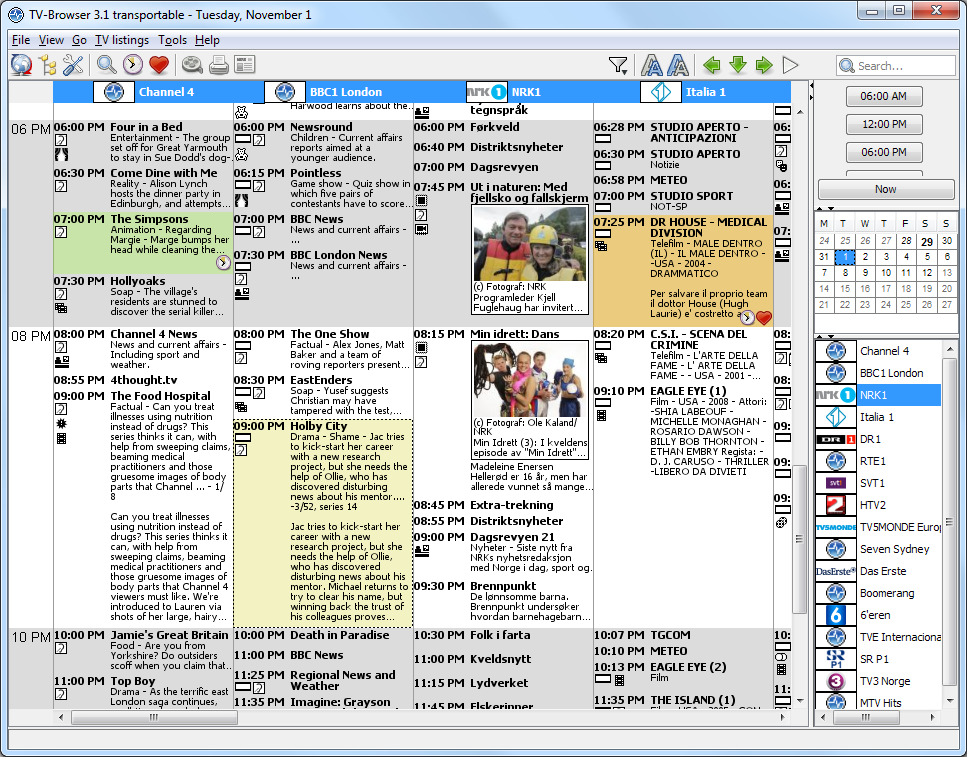



TV-Browser is a free, open-source digital television guide for viewers who want to check broadcast schedules on a computer. It retrieves program information from the internet and organizes it in a clear, grid-like layout similar to a printed TV guide. The application is for finding out what is scheduled across supported channels; it does not stream or play television broadcasts. An internet connection is needed to update the program data, but not simply to consult information that has already been downloaded.
The guide supports more than 500 channels, making it possible to see schedules from a broad range of broadcasters in one place. Users can browse the listings to check what is airing and when, then compare programs across channels while planning what to watch. Presenting the schedule in a familiar guide format makes it easier to scan a day's broadcasts than to visit individual channel websites. The data is refreshed online, so users can update the guide when they want current listings.
TV-Browser can be adjusted with different skins and icons, allowing its appearance to be changed from the default presentation. A range of plugins can add features to the application, so users can extend the basic guide according to their needs. These options make it useful both as a straightforward schedule viewer and as a more customizable desktop guide. The program contains no advertising, and its open-source code is available for inspection.
Typical uses include checking a program's broadcast time, exploring what is on across several channels, and consulting an updated schedule before settling on a show. It is a reference tool rather than a replacement for a television, set-top box, or streaming service: watching a listed program requires a separate way to receive it. TV-Browser is free to use and is designed to run on systems with a Java runtime environment installed. It is available for Windows, including Windows 10 and Windows 11, and its Java requirement also allows it to run on other supported systems.