eMule Plus
eMule Plus is a peer-to-peer file-sharing client compatible with the eDonkey network. It is intended for users who want to find and transfer files through a ...

µTorrent is a compact BitTorrent client for downloading and sharing files through peer-to-peer connections. It manages multiple transfers, displays their progress and provides bandwidth controls to help keep other network activity responsive. Support for µTP is intended to reduce congestion, while remote access, interface customization and optional App Studio additions provide extra ways to manage and tailor the client.
| Author: | utorrent |
| License: | Open Source |
| Price: | FREE |
| Released: | Jun 26, 2024 |
| File size: | 5.10 MB |
| Downloads: | 1967 |
| Keywords: | file sharing, peer-to-peer file sharing, uTorrent remote control features, peer to peer, torrent bandwidth control, torrent client, bandwidth prioritization, downloader, RSS auto-downloading, peer to peer sharing, bittorrent downloader, p2p, µtorrent remote, lightweight software, torrent, peer2peer, manage torrent downloads, BitTorrent protocol |
| Author URL: | https://www.utorrent.com/ |


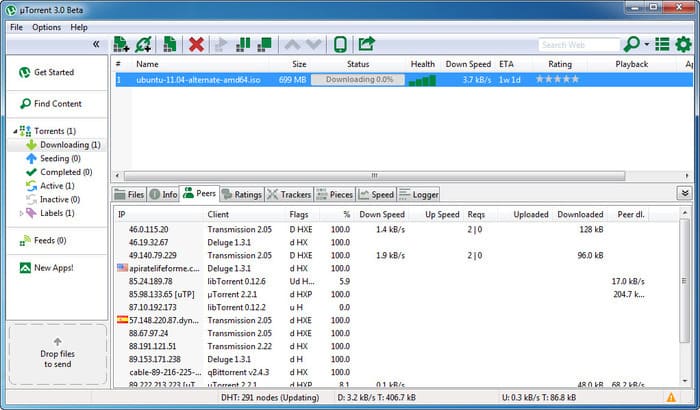


µTorrent is a BitTorrent client for Windows that transfers files through peer-to-peer connections. Rather than downloading a file from a single server, it connects to other users sharing pieces of the same torrent. It is suited to people who use torrent links or files to download and share content, and is designed to run in the background with modest use of system resources.
The client manages active torrent transfers in one interface, where users can start, pause or stop downloads and monitor their progress. Torrent transfers can also upload pieces to other peers, so the program supports both downloading and sharing. Its bandwidth controls help balance transfer activity with other network use; automatic adjustment can reduce interference with tasks such as calls, games or video streaming. Queueing and transfer management make it easier to handle several torrents without treating each one as a separate task.
µTorrent supports the µTP transport protocol, which is intended to make efficient use of available bandwidth and reduce network congestion. The program can run quietly in the background, while its compact design limits the space it takes on a Windows system. Optional interface customization includes replacement icons, toolbar graphics and status icons, and language support allows the interface to use available translations. Users can also create or edit language files.
For remote access, µTorrent Remote lets users reach a home client from another location. The program also offers optional additions through its App Studio, allowing users to choose extra features or content rather than loading every addition into the core client. These tools can help people manage transfers away from their computer or tailor the interface to their preferences.
Typical uses include downloading large files distributed through torrents, sharing files with peers and managing several transfers while continuing to use the computer. µTorrent is available for Windows 10 and Windows 11, as well as earlier Windows releases. During installation, review any optional third-party software and browser-setting offers so that unwanted changes are not accepted. Torrent technology is a transfer method; users remain responsible for having permission to download and share the files they choose.