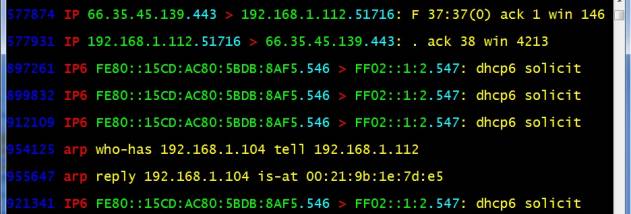

WinDump screenshot

WinDump 3.9.5

Command-line packet capture for Windows

WinDump is a Windows command-line network analyzer based on tcpdump. It captures traffic from network interfaces, displays packets as they arrive and applies filters to focus on specific hosts, protocols or ports. Captures can be saved for later analysis. WinDump uses the WinPcap library and drivers, and supports 802.11b/g wireless capture with a compatible AirPcap adapter.

WinDump 3.9.5 details

Author:
License: Open Source
Price: FREE
Released:
File size: 573 kB
Downloads: 817
Keywords: packet capture filters, Packet Analysis, Data Capture, dump traffic, winpcap packet capture, Traffic Monitoring, diagnose, capture, tcpdump command, Command Line Interface, command line packet analyzer, diagnose traffic, network traffic capture, windump download, Protocol Debugging, tcpdump, tcpdump for windows, Network Diagnostics
Author URL: http://www.cacetech.com/
WinDump screenshot
WinDumpOtherWindows XP, Windows Vista, Windows Vista x64, Windows 7, Windows 7 x64, Windows 8, Windows 8 x64, Windows 10, Windows 10 x64, Windows 10, Windows 10 x64

User Rating: 3.0 (20 votes)

Windows 10

x32

Windows 10

x64

WinDump Awards

Windows 10 download editor's pick

WinDump for Windows 10 - Full description

WinDump is a command-line network analyzer for Windows and a Windows counterpart to tcpdump. It is suited to network administrators, security analysts and technically minded users who need to inspect traffic without a graphical interface. Its tcpdump compatibility makes it familiar to people who already use packet-capture commands on UNIX-like systems, while its text-based output works well in scripts and remote or minimal environments.

The program captures packets from a selected network interface and displays traffic as it arrives. Capture and display filters let users narrow the information to relevant hosts, protocols, ports or other packet attributes, including with complex rule expressions. This is useful when a busy network produces more data than can be examined at once: a focused filter can isolate a particular connection or type of traffic for troubleshooting.

WinDump can also write captured packets to disk for later analysis. Saved captures provide a record that can be reviewed separately, shared with colleagues or used to compare network behavior over time. The command-line workflow supports repeatable investigations: users can run a capture with defined options and filtering rules, then retain only the traffic needed for diagnosis. The program is designed to watch, diagnose and record network traffic rather than provide a graphical dashboard or automated security assessment.

Typical uses include checking whether a service is exchanging packets, investigating connectivity problems, examining protocol activity and collecting evidence for further packet analysis. Wireless capture and troubleshooting for 802.11b/g networks is supported when used with a compatible CACE Technologies AirPcap adapter. For standard packet capture, WinDump relies on the WinPcap library and drivers, which must be available separately; capture access can also depend on interface and system permissions.

WinDump is free, open-source software released under a BSD-style license. It is intended for Windows and is available for Windows 10 systems. Its compact command-line approach is best suited to users comfortable entering commands and interpreting packet-level output; it does not aim to replace a general-purpose graphical network monitor.

WinDump for Windows 10 - Post your review