Pale Moon
Pale Moon is an open-source web browser for Windows, built from Firefox source and tuned ... It is intended for people who want a browser with familiar web navigation and page rendering, while ...

BonBon Web Browser is an open-source browser for everyday web use, with a clean interface designed to keep common controls accessible. It supports tabbed browsing and extensions, so users can keep multiple pages open and add compatible tools for productivity or security. Customizable privacy settings, tracking protection and ad-blocking help limit unwanted tracking and advertising. BonBon is available for 64-bit Windows 10 and Windows 11.
| Author: | danielfebrero |
| License: | Open Source |
| Price: | FREE |
| Released: | Feb 8, 2025 |
| File size: | 75.00 MB |
| Downloads: | 310 |
| Keywords: | lightweight, windows web browser, download BonBon Web Browser, open source, BonBon Web Browser free download, Secure Browsing, privacy-focused, bonbon web browser, user-friendly, web browsing, browser with tracking protection, browser with ad blocking, web, Privacy Browser, fast browsing, customizable, privacy web browser, open source browser, BonBon Web Browser, open-source, secure, GitHub, privacy, browser, Web Browser, danielfebrero |
| Author URL: | https://github.com/BonBon-exchange/bonbon-web-browser |


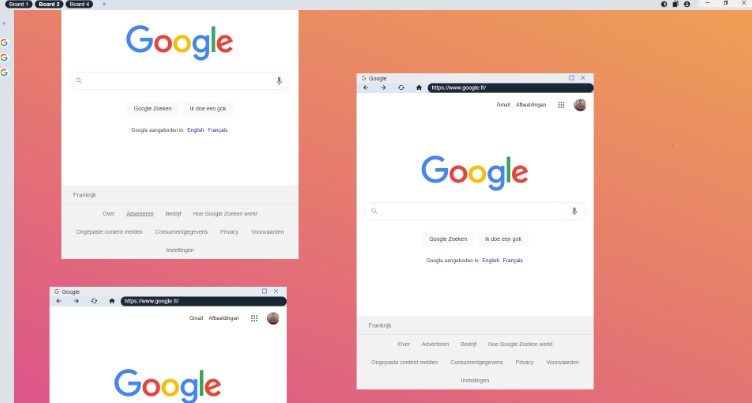

BonBon Web Browser is an open-source web browser by danielfebrero for people who want a straightforward way to visit websites, work across tabs and adjust basic browsing protections. Its uncluttered interface keeps common browser functions easy to reach, while its focus on simplicity makes it suitable for everyday browsing as well as users who want to tailor their setup with extensions and privacy options.
The browser is designed for quick page loading and smooth navigation. Users can move between sites and keep several pages open in tabs, with a lightweight approach intended to keep routine browsing responsive. This can be useful when researching a subject, checking several services at once or switching between work and personal pages. The interface emphasizes essential controls rather than a crowded layout, helping keep the active page in focus.
BonBon includes customizable privacy settings, tracking protection and ad-blocking features. These tools can help limit some forms of online tracking and reduce advertising content while browsing. Privacy controls let users choose settings that fit their preferences; they do not replace careful handling of personal information or other security practices. The browser also incorporates measures intended to protect against malicious websites and online threats.
Extensions provide a way to adapt the browser for different tasks. Users can add compatible tools for productivity, security or other browsing needs, bringing selected utilities into their usual workflow. This makes BonBon more flexible than a browser limited to its built-in functions, while allowing users to keep their setup focused on the features they actually use. Its combination of a minimal interface, extensions and adjustable privacy tools supports both casual browsing and more customized use.
BonBon Web Browser is offered as open-source software and is available for 64-bit Windows 10 and Windows 11. It can serve as a general-purpose browser for visiting websites, comparing information, using online services and managing everyday web tasks. The available platform information is limited to Windows, so users on other operating systems should check the project's own resources for current availability. The installation file is approximately 76.8 MB.