IPSwitcher for Windows 10 - Full description
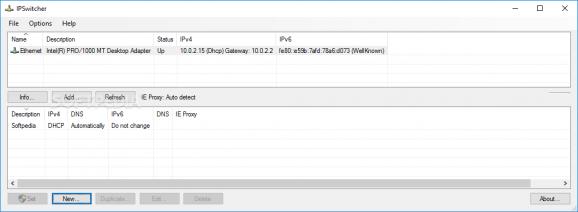
IPSwitcher is a Windows utility for saving and applying network configuration profiles. It is intended for people who connect a computer to different networks and need to change settings such as IP addresses and DNS servers repeatedly. Instead of entering those values manually each time, users can keep separate profiles for environments such as home, work, or a test network and apply the appropriate configuration when they move between them.
A profile can store IPv4 or IPv6 settings, including an IP address, subnet mask, gateway, and DNS servers. Users create profiles for the network arrangements they use, then select and apply one when a change is needed. This is useful when a computer must use a fixed address on one network but different settings elsewhere, or when network parameters need to be changed frequently during IT and administration work. Keeping values grouped by environment also reduces the need to remember and re-enter each setting.
IPSwitcher can run custom scripts before or after it applies a profile. This allows users to add their own actions to the changeover process, such as running a command associated with a particular network setup. The utility is designed to keep the profile-switching workflow straightforward, while script hooks provide additional flexibility for users who need more than basic address changes. Its compact file size and portable operation also make it suitable for carrying between computers without a conventional installation.
Typical uses include switching a laptop between office and home networks, preparing a machine for different network segments, and applying known configurations during troubleshooting or routine administration. Profiles are most helpful when the same sets of network parameters recur; they do not replace the need to obtain valid settings from the relevant network administrator or service. Custom scripts can support a user's workflow, but their contents and effects depend on what the user configures.
IPSwitcher is freeware from Mark Veldt. It supports Windows systems, including Windows 10 and Windows 11, and requires .NET Framework 2.0. The utility is intended for changing network configuration on Windows rather than managing routers or providing network connectivity. Because applying network settings can affect access to a local network or the internet, users should choose the profile that matches the network they are connected to.