WhoCrashed
... focused on diagnosing Windows crashes rather than general system monitoring, and its reports are best treated as diagnostic guidance alongside other troubleshooting information. ...

LatencyMon checks whether a Windows PC can handle real-time audio and other latency-sensitive work. It measures kernel timer latency, ISR and DPC execution times, and hard pagefaults, then reports potential sources of delays, including relevant drivers, kernel modules and processes. The measurements help investigate audio dropouts and buffer underruns without changing system settings.
| Author: | Resplendence Software Projects Sp. |
| License: | Freeware |
| Price: | FREE |
| Released: | Jul 31, 2023 |
| File size: | 3.31 MB |
| Downloads: | 554 |
| Keywords: | measurement, Resplendence Software Projects, audio drop-outs, measure, DPC latency, real-time audio latency, hard pagefault monitor, ISR excecution time, DPC measurement, isr execution time, audio dropout diagnostics, LatencyMon, DPC, audio dropout, real-time audio, dpc latency monitor, system monitoring, latencymon |
| Author URL: | https://www.resplendence.com/ |
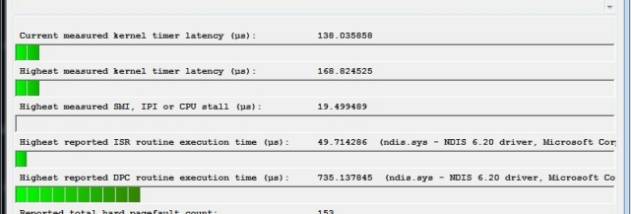

LatencyMon is a Windows diagnostic utility for checking whether a computer can handle real-time audio and other latency-sensitive work. It monitors kernel activity that can delay an application from delivering audio buffers on time, helping musicians, audio engineers and other users investigate dropouts, clicks or interruptions. Rather than changing system settings, it gathers measurements and points to drivers, kernel modules and processes associated with long delays.
During a monitoring session, LatencyMon measures kernel timer latency and records the execution times of interrupt service routines (ISRs) and deferred procedure calls (DPCs). These routines handle work triggered by hardware and run at elevated priority, temporarily interrupting ordinary application threads. If an ISR or DPC takes too long, an audio application may miss its opportunity to provide the next buffer. LatencyMon reports the highest observed execution times, giving users a way to identify unusually long activity during the test.
The utility also tracks hard pagefaults, which occur when Windows must retrieve a memory page that is not currently resident in physical memory. Reading that page from storage can take long enough to interrupt time-sensitive work. LatencyMon records these events alongside its ISR, DPC and timer measurements, and in many cases identifies the modules and processes involved. Its report presents an overview of potential causes as well as sampled data for closer examination.
A typical use is to run a monitoring session while reproducing an audio problem or carrying out the workload that needs consistent response times. Users can then review the report to see whether interrupt handling, deferred work or hard pagefaults coincide with elevated latency, and use the named components as leads for further troubleshooting. The results help narrow an investigation; they do not by themselves change drivers or guarantee that a system will perform reliably under every workload.
LatencyMon is freeware for Windows, including Windows 10 and Windows 11. Its measurements are intended for diagnosis and may vary with the hardware, drivers and activity present during a session. A report describes observed behavior during monitoring, so testing under conditions similar to the affected workload makes the findings more useful.