LAN Speed Test
LAN Speed Test measures file-transfer performance on local drives ... users diagnosing slow storage, checking wired or wireless LAN throughput, or comparing network performance across computers. The ...

NetResView is a compact LAN browsing utility that scans a local network and displays discovered computers, disk shares and printer shares in one window. It can show resources across domains and workgroups, including administrative and hidden shares. An Advanced Options dialog lets users choose scan settings before the utility searches the network. It is freeware and runs without installation or additional DLL files.
| Author: | NirSoft |
| License: | Freeware |
| Price: | FREE |
| Released: | Nov 8, 2013 |
| File size: | 41 kB |
| Downloads: | 256 |
| Keywords: | network resource, hidden share viewer, LAN, user-friendly interface, x64 software, shared printer finder, network share scanner, viewer, network resources viewer, Windows 10 compatible, analysis, NirSoft NetResView, network computer discovery, detailed network information, network analysis, LAN viewer, lan resource viewer, lan inventory tool |
| Author URL: | https://www.nirsoft.net/ |
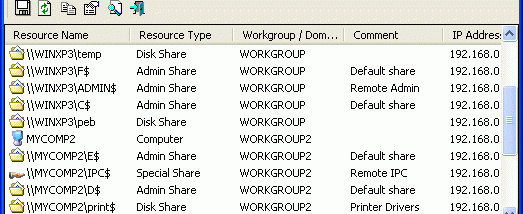

NetResView is a lightweight LAN browsing utility for administrators and other users who need a consolidated view of network resources. It scans a local network and displays discovered computers, disk shares and printer shares in a single window, including resources from different domains and workgroups. Unlike the Windows My Network Places view, it can also show administrative and hidden shares when they are discovered.
On launch, NetResView opens an Advanced Options dialog where the user chooses the scanning options. After the scan starts, the program gathers network resource information from computers on the LAN and presents the results together, rather than requiring separate browsing through each domain or workgroup. This makes it useful for surveying what is visible across a network from one place.
The results cover several common resource types: computers identify networked systems, disk shares reveal shared folders or drives, and printer shares show printers made available over the network. Administrative and hidden shares can be included, which may help network administrators inspect resources that are not presented in ordinary browsing views. Their visibility does not grant access; permissions on the network still determine whether a resource can be opened or used.
NetResView is suited to basic network inventory and troubleshooting, such as checking which computers and shared resources are discoverable on a LAN. Its single-screen view can also help when a network spans several workgroups or domains and the standard Windows network browser does not provide the desired overview. The tool reports discovered resources; it is not a substitute for configuring shares, managing permissions or diagnosing every network connection problem.
The utility is freeware and portable. It runs directly from its executable, requires no installation and does not need additional DLL files, so it can be placed in a chosen folder and started from there. The supplied operating-system support covers older Windows releases through Windows 8; compatibility with later Windows versions is not established here. NetResView is a compact tool focused specifically on discovering and viewing LAN resources.