PC On/Off Time for Windows 10 - Full description
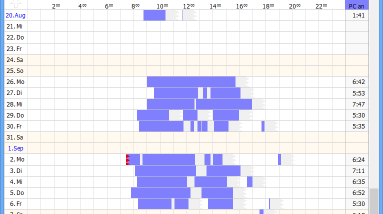
PC On/Off Time is a lightweight time-monitoring utility for checking when a Windows computer has been running, shut down or in standby. It is suited to people who need a quick overview of computer availability, such as households checking general usage patterns or workplaces reviewing computer hours. Rather than keeping its own activity recorder running, the program reads information Windows has already stored in the computer's event log and presents the results as a graph covering up to three weeks.
The graph helps make operating periods easy to scan: users can see when the PC was switched on, when it shut down and when it entered standby. This can help explain when a computer was available for work, reveal unusually long periods of use, or spot a machine that was left on after it was no longer needed. The display focuses on system operating times; it does not record which applications were used or what a person did on the computer.
PC On/Off Time can also connect to computers on a network and create reports of login and logoff times. This makes it useful for reviewing when other PCs were accessed, or for basic timesheet and project-progress checks where computer availability is relevant. At home, the same records can help parents understand broad patterns of computer use. The reports concern recorded login and logoff events, rather than detailed user activity or content.
The program does not need to run continuously, install itself, write to the Windows registry or modify files outside its own directory. This keeps its operation simple and avoids maintaining a separate background logging process. Its reliance on Windows event logs is also an important limitation: if relevant records are missing or incomplete, the graph and reports cannot show information that the log did not retain. Daylight-saving-time corrections are supported.
PC On/Off Time is freeware from A. & M. Neuber Software, available in English and German. It is a small utility for Windows, with Windows 10 among its supported systems. The Pro and Net editions provide additional capabilities, including longer-term records, automatic backups and network-user graphs; those features are separate from this free edition. The program is intended for reviewing computer on/off and login/logout times, not for comprehensive employee surveillance or detailed application tracking.