Remote Memory Info
Welcome to our Windows 10 download site, your one-stop destination for top-notch software ... Info," developed by the renowned Nsasoft LLC. The Remote Memory Info is a unique software designed to ...

PrinterShare enables printing to a printer connected to another computer over the internet. Users can send documents or photos from applications such as Word, Outlook and photo editors, without emailing files to the printer owner. Printer owners can share a locally connected or network printer with chosen contacts, avoiding manual Windows network-sharing setup and access-right configuration.
| Author: | PrinterAnywhere Inc |
| License: | Freeware |
| Price: | FREE |
| Released: | Dec 13, 2022 |
| File size: | 19.30 MB |
| Downloads: | 253 |
| Keywords: | PrinterAnywhere Inc, network printer, software review, PrinterShare, x64 software, share a printer online, print from another computer, Windows 10, printer, print remote, print over the internet, remote printing, remote printer, remote printer sharing, print, network printer sharing, remote document printing, printer share, remote |
| Author URL: | https://printershare.net/ |
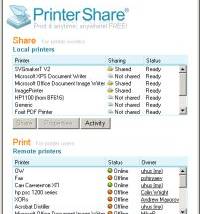

PrinterShare lets people print to printers connected to other computers over the internet, or share their own printer with friends, relatives and colleagues. It is intended for home users and small groups who need to print without configuring conventional network sharing or Windows access permissions. A shared printer can be used from a distance as well as from a nearby computer, provided both parties have PrinterShare set up and the printer is available.
Printing works from applications already used for documents and images, such as Microsoft Word, Outlook and photo editors. Instead of exporting a file and emailing it to the printer owner, the user selects the remote printer through the normal print workflow. This makes it practical for printing letters, forms, photographs and other paper documents without changing how those files are created.
To share a printer, its owner installs PrinterShare and chooses which connected printer other people may use. The software detects printers attached to the computer and printers available on its local network. The owner can then make a printer available to selected contacts, while other users choose it as a destination for their print jobs. The printer still needs to be connected and ready on the sharing computer when a job is sent.
PrinterShare is useful when people in different homes or offices need access to a particular printer, or when a user is working away from the computer that has the printer. It can also provide a simple alternative to manually setting up network printer sharing, especially for users who do not want to manage network details and access rights. The program handles printing initiated from other applications, so it does not require a separate document-transfer step.
PrinterShare is freeware for Windows. The supplied operating-system information covers Windows XP through Windows 10, including listed 64-bit editions of Vista, Windows 7 and Windows 8, and Windows 10 x64. The basic arrangement depends on an internet connection and on the host computer and printer being available to receive jobs. Its purpose is straightforward: share access to a physical printer rather than transfer files for someone else to print manually.