SmartCode VNC Manager
Welcome to the download page for SmartCode VNC Manager, a top-tier software developed by the innovative team at SmartCode Solutions. This powerful tool is designed to ...

TightVNC is VNC-based remote desktop software for viewing and controlling another computer over a network. Its Windows package includes a Viewer for connecting to remote machines and a Server for accepting connections. Users can control the remote mouse and keyboard, share clipboard text when enabled, adjust image quality and scaling, and configure password protection. It is useful for support, administration and remote access.
| Author: | GlavSoft LLC (Constantin Kaplinsky) |
| License: | Open Source |
| Price: | FREE |
| Released: | Oct 30, 2026 |
| File size: | 2.00 MB |
| Downloads: | 366 |
| Keywords: | remote computer control, vnc viewer, Screen Sharing, remote administration, Windows 10 Compatible, administration, Secure Connection, User-Friendly Interface, Remote Access, remote control, remote customer support, Tight VNC, remote, remote access software, remote tech support, tightvnc download, vnc remote desktop, TightVNC Group |
| Author URL: | https://www.tightvnc.com/ |


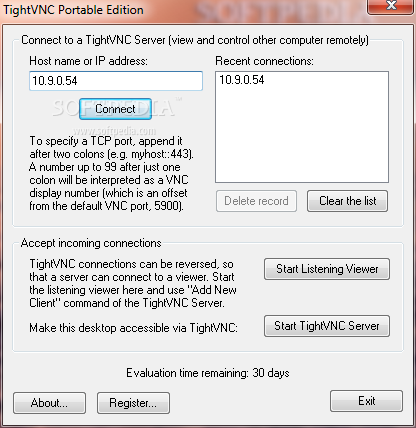

TightVNC is remote desktop software based on Virtual Network Computing (VNC). It lets a user view and control a computer from another device over a network, making it useful for home access, technical support, system administration and remote collaboration. Its Windows installation includes a Viewer for connecting to other computers and a Server that allows the local computer to accept connections.
To start a session, the Viewer connects to a remote computer using its name or IP address and a port. Once connected, the operator can see the remote desktop and use its mouse and keyboard, subject to the permissions and settings on the server. Clipboard sharing can make it easier to move text between the two computers when enabled. In listening mode, the Viewer waits for an incoming connection from a TightVNC Server, a useful option when the person providing support initiates the session.
Connection settings allow users to adjust image quality, scaling and encoding to suit the available network and the task. Lower image quality can reduce the amount of screen data sent, while a larger view can help with detailed work. Setup options support different installation needs, and password-based authentication can be configured for access. The interface and settings can also be protected with an administrative password. Remote access may require network or router configuration so that the computer can be reached from outside its local network; administrators should configure access carefully and restrict it to trusted users.
Typical uses include helping someone troubleshoot a computer, managing unattended machines, accessing a home or office desktop while away, and demonstrating software during an interactive lesson. Because the remote operator works with the computer's actual desktop, TightVNC can support tasks that are difficult to handle through file sharing alone. Session sharing can also let another person observe or assist with work, depending on how the host is configured.
TightVNC is open-source software available at no cost. The supplied Windows package supports Windows 10 and Windows 11, as well as several earlier Windows releases. The Viewer and Server serve different roles, and both are installed by default, so users can connect outward or permit incoming connections. It uses VNC, which also has implementations on other platforms; network reachability and security depend on the host configuration and the surrounding firewall or router.