To Google Translate for Windows 10 - Full description
To Google Translate is a Firefox extension for people who come across unfamiliar languages while browsing and want to send text to Google Translate without copying it manually. It adds translation actions to the browser's context menu and toolbar, keeping the process close to the page being read. Translations are handled by Google Translate, which opens in a browser tab rather than translating content inside the extension itself.
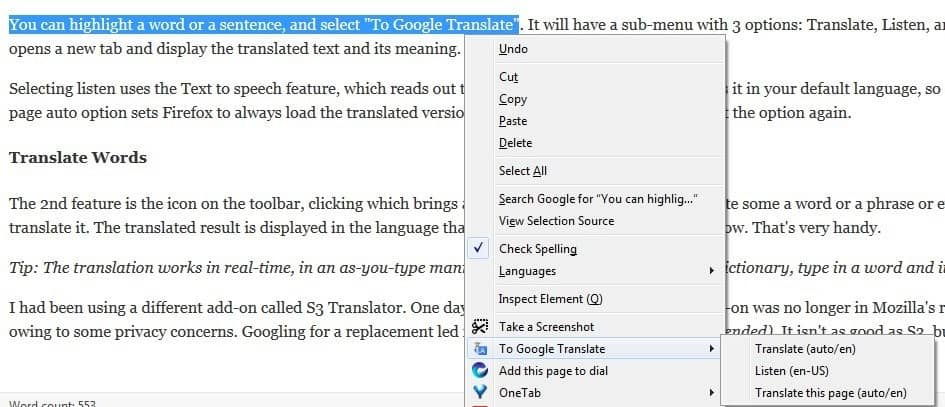
For a short passage, the user selects text on a webpage and opens the right-click menu. Choosing the extension's translation option sends that selection to Google Translate for translation into the configured target language. This is useful for checking a word, sentence, or paragraph while leaving the original page available. The extension's settings let users choose a default destination language, so they do not need to select it for each translation.
The toolbar button provides a separate route for translating a complete webpage. Clicking it opens Google Translate with the current page, where the service can display a translated version. This approach suits longer material such as articles or reference pages, while the context-menu action is more practical for isolated phrases. The extension therefore supports both quick lookups and broader reading without requiring users to re-enter the text or page address themselves.
To Google Translate is a focused tool rather than a standalone translation application: it connects Firefox browsing to Google's translation service and relies on that service for the translated result. Its lightweight design and straightforward controls are intended to keep the workflow simple. It can help with casual reading, study, research, and work involving web content in other languages, especially when users regularly need translations but do not want a more extensive language or dictionary tool.
The extension is open source and free to use. It is intended for Firefox and requires access to Google Translate for translation; it does not provide an offline translation engine. The supplied operating-system information covers Windows 7 and Windows 8, so Windows 10 or Windows 11 compatibility should not be assumed from that information. The extension is most useful when Firefox and an internet connection are available.