DMDE - DM Disk Editor and Data Recovery
DMDE is a disk editor and data recovery utility for users who ... sectors or superblocks, including backup copies where available. The disk editor provides a way to view and edit ...

WinDirStat is an open-source disk-usage viewer for Windows. It scans a drive and presents storage use in a directory tree, an extension list grouped by file type, and a treemap where larger files occupy larger areas. Selecting entries connects the views and helps locate space-consuming folders or file types. It can also open a command prompt at a selected file's location.
| Author: | Oliver Schneider |
| License: | Open Source |
| Price: | FREE |
| Released: | Oct 12, 2026 |
| File size: | 2.20 MB |
| Downloads: | 480 |
| Keywords: | treemap disk analyzer, disk usage statistics, hdd space, disk, visual data representation, disk space analyzer, hdd, disk usage viewer, find large files, hdd usage, Windows 10 compatible, usage, folder size analyzer, file cleanup tool, file type storage report, WinDirStat, Bernhard Seifert, disk usage |
| Author URL: | https://windirstat.net/ |

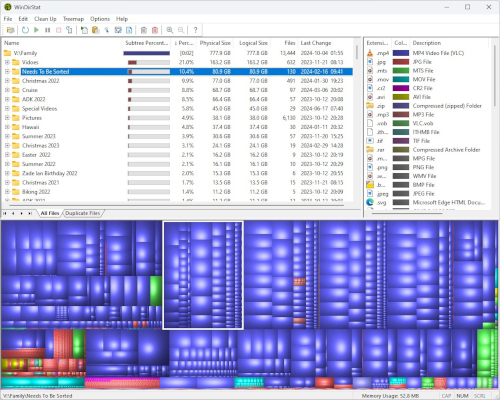


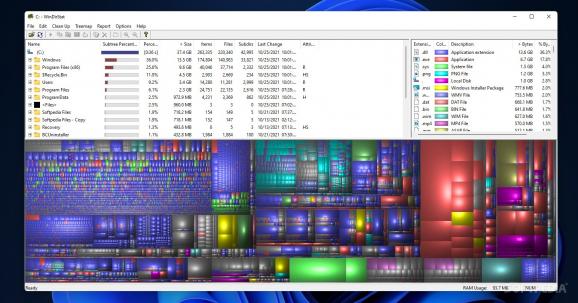


WinDirStat is an open-source disk-usage viewer for Windows that helps users find out how storage is distributed across their drives. It scans selected drives and presents the results in linked directory, file-type and treemap views. The combination is useful when a drive is nearly full, when a folder has grown unexpectedly, or when routine storage checks need more detail than the total free-space figure in Windows Explorer.
The directory list shows folders and files in a hierarchical tree, with their storage use and related details. Expanding branches helps narrow a large drive down to the folders that account for the most space. Selecting an item connects the list to the other views, making it easier to inspect its contents and location. WinDirStat can also open a command prompt at a selected file's location, providing a direct route to command-line work on that folder.
The extension list groups storage by file type, so users can spot categories that occupy substantial space even when the files are spread across many folders. For example, it can reveal a large collection of image files or other repeated formats that would be difficult to identify by browsing directories alone. The treemap translates the scanned contents into a visual map: larger files occupy larger areas, while colors distinguish file types. Selecting a block takes the user to the corresponding directory, linking the visual overview with the directory and extension details.
These views support practical cleanup decisions, such as locating oversized files, finding forgotten folders, or checking whether a particular file type is contributing to low disk space. They help identify what is using storage rather than automatically deciding what should be removed; users can inspect a file's location before taking action. This makes the program useful both for occasional troubleshooting and for a more systematic review of drives with many files.
WinDirStat is free and open source. It is intended for Windows and is available for Windows 10 and Windows 11, as well as a range of Windows Server releases. Its interface places the directory and extension lists above the treemap, keeping the three views visible together during a scan review. The scan results and visual layout are focused on storage analysis, so the program is best suited to users who want to understand disk usage and choose their own next steps rather than rely on an automatic cleanup tool.