Zenfolio Express Send
... to your one-stop destination for downloading Zenfolio Express Send, a top-notch software developed by Text Connects. This Windows 10 compatible software is a game-changer for photographers and visual ...

ZoomFoot Send Photo helps Windows users email batches of pictures without manually resizing or compressing them first. Drag and drop images into the program, enter an email address, and it packages the files and sends a secure download link. Recipients download the pictures in a browser. Optional tools resize, convert or rename images, and transfers can include up to 4 GB.
| Author: | ZoomFoot |
| License: | Freeware |
| Price: | FREE |
| Released: | May 10, 2010 |
| File size: | 1.10 MB |
| Downloads: | 317 |
| Keywords: | photo sharing utility, send photos by email, secure photo delivery, photo sharing software, send, email large photo files, Windows 10 compatible, send raw photos, email, share, high-resolution image transfer, resize photos for email, ZoomFoot Send Photo, ZoomFoot technology, photo, convert image formats |
| Author URL: | http://www.zoomfoot.com/ |
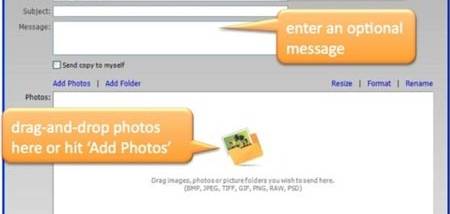

ZoomFoot Send Photo is a Windows utility for sending picture files by email without first preparing them manually. It is intended for people who need to share a batch of images while retaining the originals, including photos that are too large or numerous to attach conveniently to a standard email. Transfers can contain up to 4 GB of data.
To send images, the user drags and drops them into the program and enters an email address. ZoomFoot packages the pictures into a ZIP archive and delivers them through the internet in one step. The recipient gets an email containing a secure download link and can retrieve the images in a web browser, without needing the ZoomFoot program.
The utility can also resize images, convert them to another format, or rename them as part of the sending process. These options are useful when a recipient needs smaller files, when images must be supplied in a particular format, or when a batch needs clearer filenames. Supported file types include JPEG, RAW, TIFF, PSD, PNG, BMP and GIF, covering common photographs as well as several formats used in image editing.
ZoomFoot Send Photo is suited to sharing photo collections with friends and other recipients who may not use the same photo software. It combines basic file preparation with delivery, so the sender can choose whether to send files unchanged or apply simple changes before the recipient downloads them. The browser-based download also avoids requiring recipients to install a dedicated application.
The program is freeware and is designed for Windows. Its stated compatibility covers older Windows editions; compatibility with current Windows releases should be checked before installation. The download is approximately 1.1 MB.