FileZilla
... between a computer and a server. It supports FTP, encrypted FTP over SSL/TLS (FTPS), and SSH File Transfer Protocol (SFTP), allowing connections to be chosen according to ...

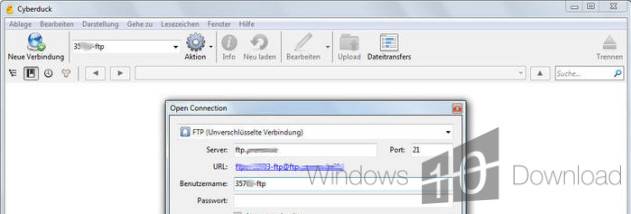
Cyberduck is an open-source file transfer client for Windows that connects to FTP, SFTP, WebDAV, and cloud storage services such as Amazon S3, Google Cloud Storage, and Microsoft Azure. Browse remote folders, transfer files with drag and drop, bookmark frequent connections, search for files, and edit remote documents through an external editor.
| Author: | David V. kocher |
| License: | Open Source |
| Price: | FREE |
| Released: | Mar 3, 2026 |
| File size: | 70.30 MB |
| Downloads: | 722 |
| Keywords: | FTP, Cyberduck, webdav client, file transfer protocol, ftp, open source, ftp browser, ftp client, ftp server, SFTP, cloud storage, ftp software, FTP client, David V. Kocher, sftp file transfer, amazon s3 browser, free ftp, GPL, remote file manager, cloud storage manager |
| Author URL: | https://cyberduck.io/ |





Cyberduck is an open-source file transfer client for people who need to move or manage files between a Windows computer and remote servers or cloud storage. It supports common transfer protocols alongside several cloud services, making it useful for website maintenance, backups, and access to hosted files from one desktop application.
Connections can use FTP, SFTP, or WebDAV, as well as services such as Amazon S3, Google Cloud Storage, and Microsoft Azure. Users choose a connection type, enter the required server or account details, and browse remote folders in the interface. Drag-and-drop transfers provide a straightforward way to move files between local storage and a remote location, while the folder view helps users navigate their stored content.
Bookmarks save frequently used servers and directories for later sessions, reducing the need to re-enter connection details or browse to the same location each time. Search helps locate files and folders in a remote directory. For editing tasks, Cyberduck can open remote files in an external editor; after changes are made, the file can be returned to the server without requiring a separate manual download-and-upload routine. Transfer logs and error messages also give users information when a connection or file operation needs attention.
The range of supported destinations makes Cyberduck suitable for different workflows. Web developers can connect to hosting accounts and update site files, while IT staff can transfer data between servers and cloud storage. Individuals can use it to organize remote folders or move files to and from supported storage services. Encryption is supported for secure transfers, with SFTP providing an encrypted connection to compatible servers. The available protocol depends on the remote service and its configuration.
Cyberduck is free and open source, and this Windows edition is intended for 64-bit Windows 10 and Windows 11. It brings remote file browsing and transfer tools together in a desktop interface, with saved connections for repeat access and support for external editors in file-based workflows. Users need access credentials for the server or cloud account they want to connect to; Cyberduck does not provide storage or hosting itself.