FlashFXP
... between a computer and remote servers. It supports FTP and SFTP connections, with tools for uploading, downloading, ... transfers, as well as HTTP, SOCKS 4/5 and FTP proxies. FXP support allows files to be transferred ...

FTPGetter Standard is a Windows FTP client for transferring files between local computers and remote servers. It supports FTP, SFTP, and FTPS, and can schedule recurring transfers to run without manual intervention. Drag-and-drop handling and a built-in file manager simplify uploads, downloads, and remote file organization. Multiple connections, file compression, custom scripts, and configurable options support larger or more tailored workflows.
| Author: | FTPGetter Team |
| License: | Demo |
| Price: | $85.00 |
| Released: | Jan 1, 2026 |
| File size: | 18.80 MB |
| Downloads: | 249 |
| Keywords: | batch processing, ftp manager, ftp client, FTP automation, ftp upload tool, Windows 10 compatible, automatic ftp, automated file transfer, ftp transfer scheduler, sftp file transfer, FTPGetter Team, ftps client, ftp, secure ftp, file transfer protocol, FTPGetter Standard, ftp scheduler |
| Author URL: | https://www.ftpgetter.com/ |

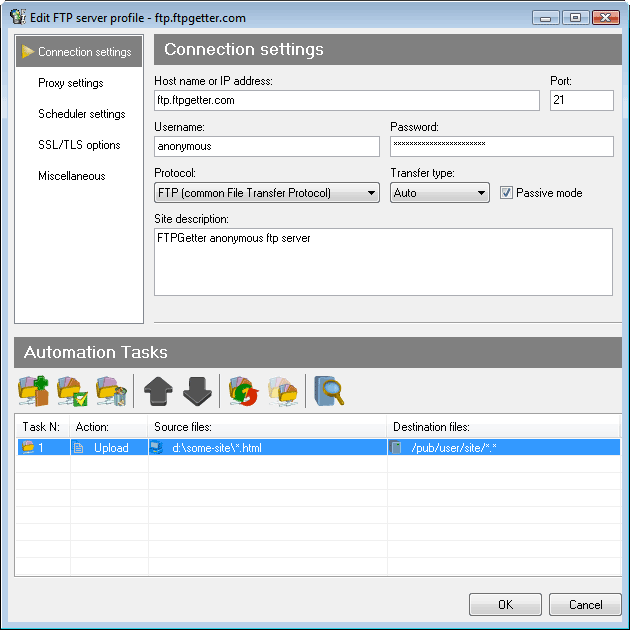


FTPGetter Standard is a Windows FTP client for people and organizations that regularly move files between local computers and remote servers. It combines manual file management with scheduled transfers, making it useful for routine uploads, downloads, and synchronization tasks. The interface includes drag-and-drop file handling, so users can move items between local and remote locations without relying only on command-based workflows.
Transfers can be scheduled to run at chosen times, allowing recurring tasks to proceed without starting each one manually. This is useful for keeping remote copies of regularly updated files or retrieving data on a repeatable timetable. FTPGetter Standard supports FTP as well as secure SFTP and FTPS connections, providing options for different server configurations and for transfers where encryption in transit is needed.
The client can maintain multiple connections and transfer several files at once, helping reduce the time spent on batches of files. Its file manager provides common operations such as renaming, moving, and deleting items, so users can organize files while working with remote storage. File compression is also supported and can be used to package data for transfer, depending on the task and server setup.
FTPGetter Standard offers configurable options and custom scripts for workflows that need more than basic file exchange. Scripts can be used to tailor operations to particular tasks, and the program can be integrated with other applications. These capabilities suit small business and personal workflows that depend on repeated file delivery, as well as administrators who need scheduled transfers alongside direct file management.
The software is distributed as a demo and is intended for Windows, including Windows 10 and Windows 11, as well as several Windows Server editions. Connection details, remote server access, and compatible protocols are needed to transfer files. The available functions make it suitable for both occasional manual transfers and routine jobs that benefit from scheduling and repeatable settings.