GreenBrowser for Windows 10 - Full description
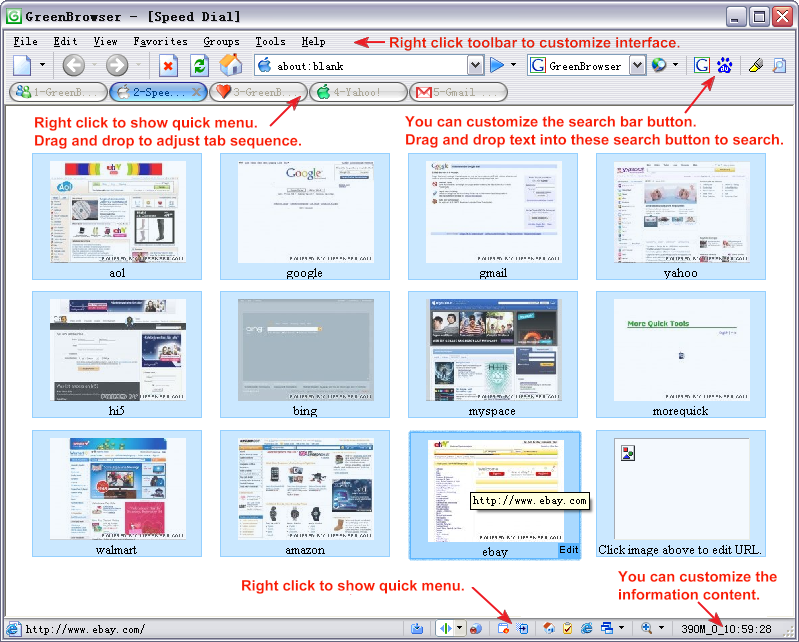
GreenBrowser is a tabbed web browser based on Internet Explorer, intended for people who want browser controls and page-management tools beyond the standard browsing interface. It combines multiple web pages in one window with features for searching, filtering ads, handling forms and adjusting how pages behave. Its interface includes a search bar, tab bar, status bar and configurable toolbars, with skins for changing the browser's appearance.
The browser's tab controls help users manage several pages at once. Tab icons indicate page states, including whether a page is still loading, has finished downloading, is locked, protected or saved. Groups can organize related pages, while the Page Manager provides another way to handle open content. Users can also set a start mode, create URL aliases and assign quick keys to commonly used actions.
GreenBrowser includes an ad filter and tools for controlling page behavior. Mouse gestures and mouse-drag actions provide shortcuts for navigation and other commands. Auto Fill Form can enter saved information into web forms, while Auto Scroll, Auto Refresh and Auto Save automate recurring page tasks. Page Zoom and background-color settings adjust how content appears, and Page Download Control, Sort Save Page and the download manager support saving and managing web content.
Search can be started by selecting and dragging text in a page, or by using buttons in the search bar. The browser supports configuring search buttons for different kinds of queries, such as news, images, dictionaries, music and software. An external toolbar can hold links to frequently used programs, with options to start them alongside GreenBrowser or close them when the browser exits. Proxy settings, plug-ins, a link list and system-cleaning tools provide further configuration and maintenance options.
GreenBrowser is freeware and is based on Internet Explorer, so its browsing engine depends on Internet Explorer components available on the system. It is aimed at users who prefer a feature-rich interface with detailed controls for tabs, searches and page handling. The supplied system compatibility information includes Windows versions through Windows 10; it does not list Windows 11. The interface supports multiple languages, including English, Simplified and Traditional Chinese, Dutch, French, German, Italian, Japanese and Korean.